


 Our company
 Our work
 Technology
 Learn
Learn Connect


In a world that demands instant results, sending manual emails, juggling a high volume of contacts, and perfecting send times can be overwhelming. If you feel like this, you are not alone. These are common, and time consuming issues that cause lost opportunities and disengaged customers.
Fortunately, HubSpot's email automation helps take the guesswork out of strategic, timely and personalised communication and enables you to send automated emails that will improve your customer’s experience while scaling results.
HubSpot automated emails are built into their Marketing Hub and connect directly to your CRM. As a HubSpot Elite Partner, with over 350 implementations under our belt, MO Agency has helped many businesses achieve success utilising various HubSpot marketing tools.
Using a HubSpot automated email is a simple, yet effective tool, removes the guesswork and puts you as the business owner in control of how you engage with your customers.
In this guide, we will share our expertise to help you build high-performing automated email workflows with confidence.
What You’ll Learn in This Guide
- How automated emails drive engagement and conversions.
- The direct impact that automated email strategies can have on your business growth.
- How to create and set up your first HubSpot automation with a step-by-step guide.
- Common workflow mistakes and how to avoid them, with common errors and practical advice to prevent them.
- How to use HubSpot’s AI features to improve your email performance, using personalisation and sending times.
- Proven email automation best practices based on MO Agency’s practical, real-world experience to get the most out of your automation.
- How to track, analyse and improve your email workflows by paying close attention to key metrics and what strategies to implement for continuous improvement.
What Is Email Automation?
Email automation allows you to send timely and relevant messages automatically, without manually needing to press send every time.
Automated emails are triggered by customer actions, specified triggers or schedules. Unlike scheduled emails which are delivered to a list of customers at a set time, automation adapts to your audience’s behaviour, so each message feels personal, intentional or suits their position within their journey.
Email automations help businesses improve their communication with their customers, while simplifying their workload and improving customer engagement and experience.
Email automation falls into three categories:
- Drip campaign: This refers to a sequence of scheduled emails sent at intervals to specific contacts. Drip campaigns are best suited for new subscribers, educational or onboarding information, or brand awareness.
- Trigger-based emails: This refers to emails that are sent straight after specific actions are completed, such as form submissions, product purchases, email opens or button clicks and/or abandoning a cart. Trigger-based emails are sent to encourage further action or provide clear next steps for your contacts.
- Behavioural automation: This refers to emails that adapt to specific contact behaviours such as page visits, purchase history or how often they engage with your website or emails. Using specific behaviours to send personalised emails, at the right time.
Email automation outperforms manual sending because it can more effectively personalise, scale, and track performance. Due to their timely nature, automated emails have higher open rates, click-through rates, and conversion rates.
Common email automation myths include:
- Automation is spammy. If poor targeting is applied to your automations, messaging becomes generic and comes across as spam because it is irrelevant to specific contacts.
- Automation is for large businesses only. Small-large businesses can make use of email automation for improved performance, while reducing their workload.
- Automations are impersonal. When set up correctly, however, they can make emails feel more personal by using personalisation, a specific sending time, and following contacts throughout their buyer journey.
What is HubSpot Email Automation?
Built into its CRM, HubSpot’s email automation tool combines powerful functionality with user-friendly design to help build highly personalised, email campaigns.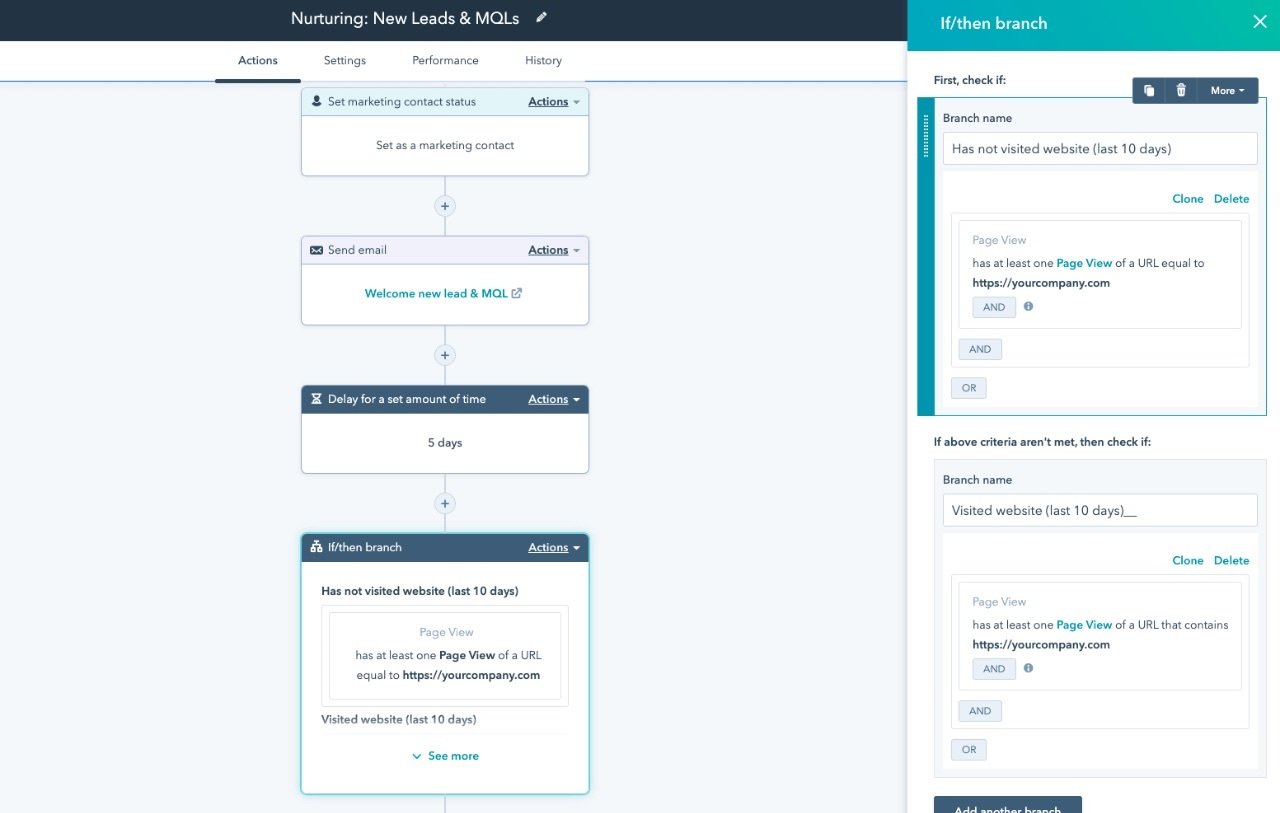
Key HubSpot Email Automation features include:
- Visual workflow builder: A simple drag-and-drop interface to create complex workflows to suit your customer journeys.
- CRM-driven triggers: Emails are triggered automatically by specific interactions, updates or lifecycle stages based on the data within your HubSpot CRM.
- Template library: Browse and utilise pre-built HubSpot email automation templates to get you started with professional and effective emails.
- Advanced personalisation: Make use of HubSpot’s custom tokens, dynamic content and smart rules to personalise your emails to your audience and improve your customers’ experience.
- AI-driven tools: HubSpot’s AI suggests subject lines, optimal send times, automated content recommendations and easy A/B testing to improve performance.
Compared to Mailchimp or ActiveCampaign, HubSpot stands out due to its deep CRM integration and advanced AI-powered personalisation, to build richer and more effective customer relationships.
Building Smarter Email Workflows in HubSpot
Get the most out of your HubSpot email automations by strategically incorporating your unique brand messaging with HubSpot’s workflows. Here’s a practical approach:
Lifecycle-Based Journeys
Lifecycle-based email journeys are designed to nurture, educate and convert your contacts based on where they are within their lifecycle stage or customer journey.
The communication within these emails is aligned to the contacts' current needs, enabling them to complete an action or convert.
- Welcome series: Welcome and engage with new subscribers immediately and effectively, introducing them to your brand and offerings through a simple workflow of informative, credibility-building and appealing email communication.
- Marketing-qualified lead nurture: Send out targeted content that is aimed at moving prospects closer to buying. This can be done by sending out communication that has social proof, displays clear benefits and desired outcomes and is personalised to the buyer.
- Sales-qualified lead follow-ups: Automate email follow-ups after initial sales interactions to boost conversion rates and keep your contacts engaged throughout their customer journey.
- Customer retention: Use email automations for onboarding, continuous email engagement and future upselling opportunities to keep customers connected, happy and loyal.
Behaviour-Triggered Emails
Behaviour-triggered emails are sent out as a direct response to a contact’s behaviour or actions, such as:
- Website activity (visiting a specific page, viewing pricing, etc.)
- Form submissions
- Email activity
- Purchasing behaviour
- Inactivity or drop-off
- Milestones reached (birthdays, anniversaries, renewal dates, etc.)
Sending out emails based on the contact’s behaviour allows them to receive relevant and timely information, right when they need it most, which will not only improve their customer experience but achieve better results.
Conditional Logic
Conditional logic within email automation makes use of conditional branches such as IF/THEN logic to add additional relevance to what information gets sent, to whom and when.
- Example 1: IF a contact clicks a specific button within an email, THEN send a follow-up email with relevant information.
- Example 2: IF a contact becomes inactive during their customer journey, THEN trigger a re-engagement sequence
HubSpot AI-Driven Automation
HubSpot’s AI-powered tools are here to help you get the best results. You have them, so use them to improve your operations and performance:
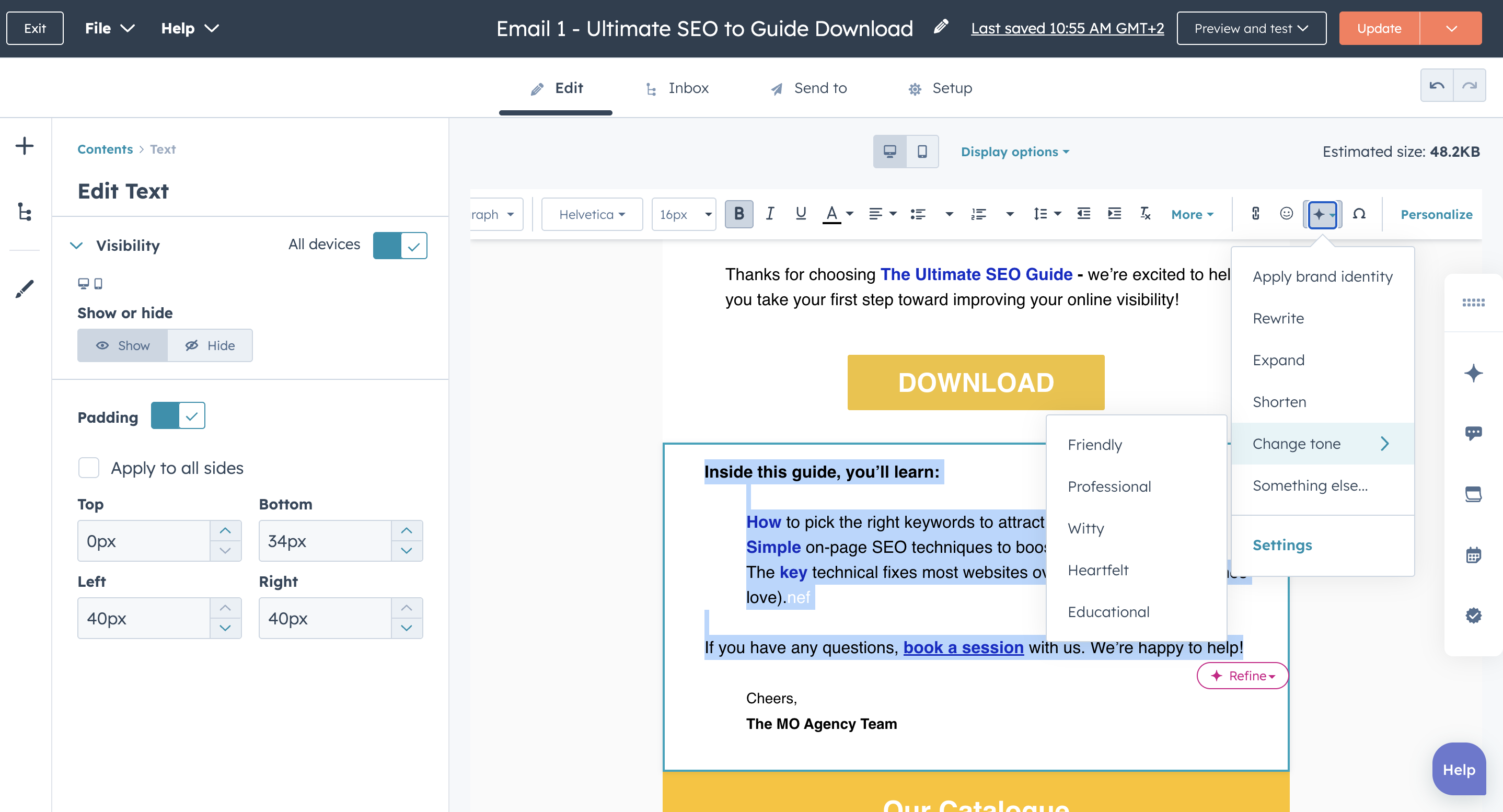
- AI-generated subject lines and content recommendations to boost engagement.
- AI-driven image suggestions to increase visual appeal and interaction rates.
- Content Remix allows you to convert blogs, social media posts and more into email content and vice versa.
How to Set Up Your First Email Automation in HubSpot
Thanks to HubSpot’s user-friendly design, setting up your first HubSpot automation is easy and can be completed within a few short steps:
1. Access workflows
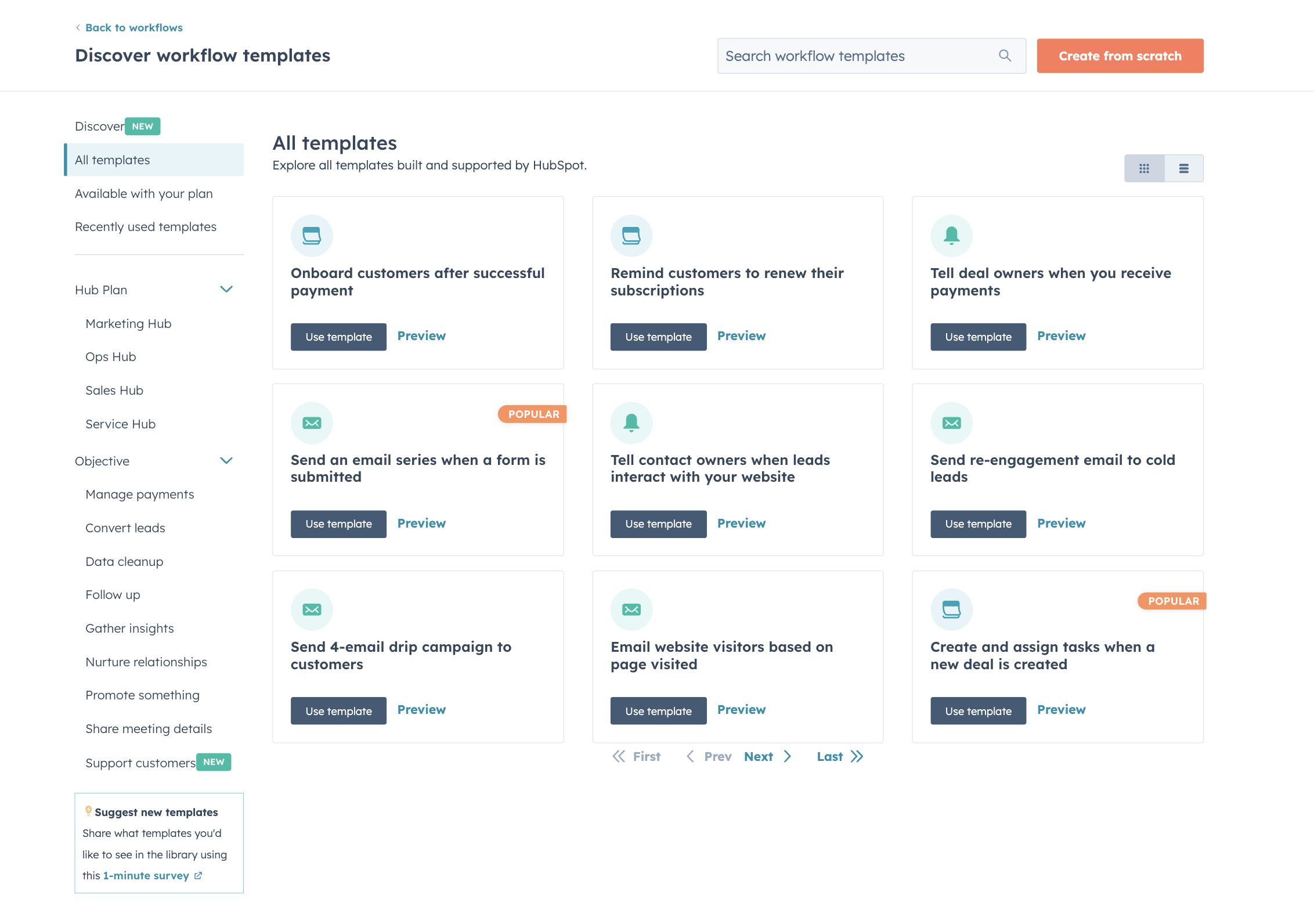
Within your HubSpot portal, go to Marketing > Automation > Workflows, then click Create. You can build your workflow from scratch or from a template. HubSpot offers templates that suit a variety of campaigns or objectives.
2. Choose a trigger
Start with something clear and actionable, like a specific form submission.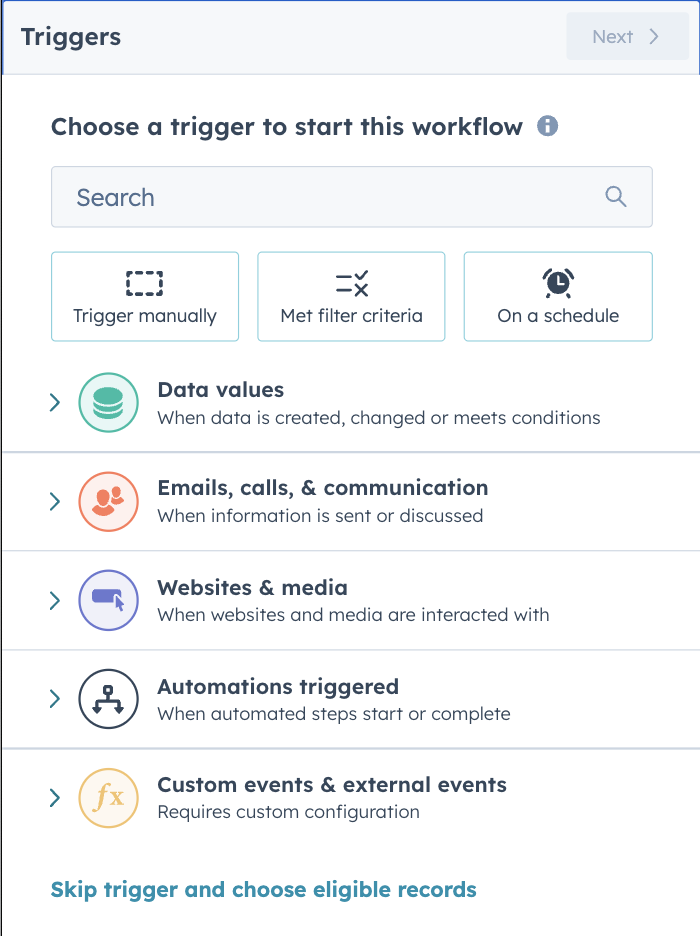
Design your workflow
Add in various emails, set delays and conditional logic.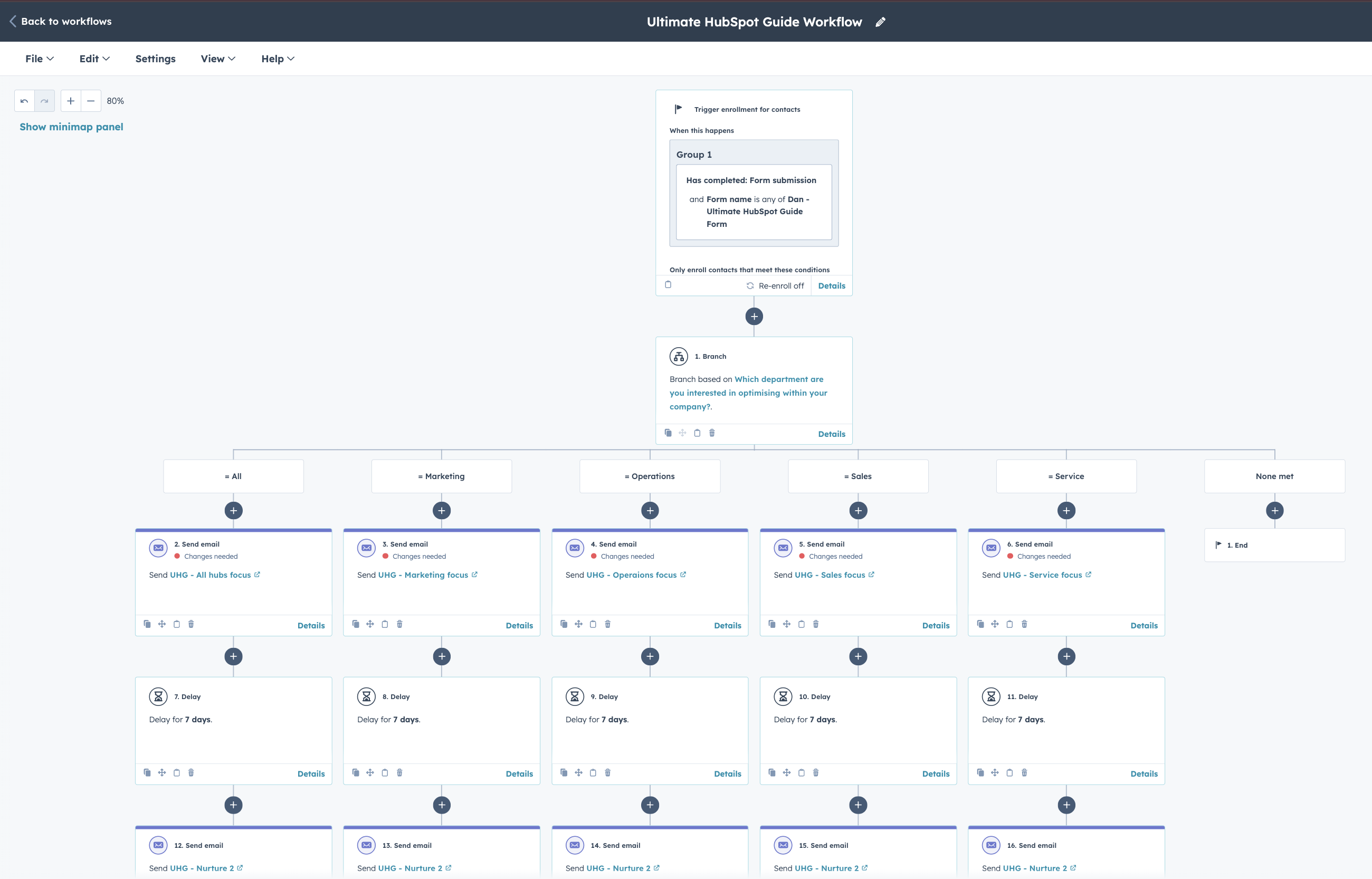
Test thoroughly
Use HubSpot’s testing features to preview and refine before activating or make use of A/B tests to compare performance over time.
Pro tips:
- Start small, with a simple workflow like a welcome series and expand as you get more comfortable.
- Use clear and descriptive naming conventions to manage workflows
- Double-check triggers, segmentation and goals to avoid common mistakes like misfires or poor targeting.
HubSpot Email Automation Best Practices for HubSpot Users
Combining HubSpot’s CRM, email and workflow features together will empower your email automation efforts.
Always keep these best practices top of mind:
- Set clear goals: before setting up your email automation and workflow, make sure you have clear objectives (lead nurturing, customer onboarding, or re-engagement) and identify what workflow is best suited to helping you reach your goals.
- Use HubSpot workflow templates: to save time while following best practices based on your goals.
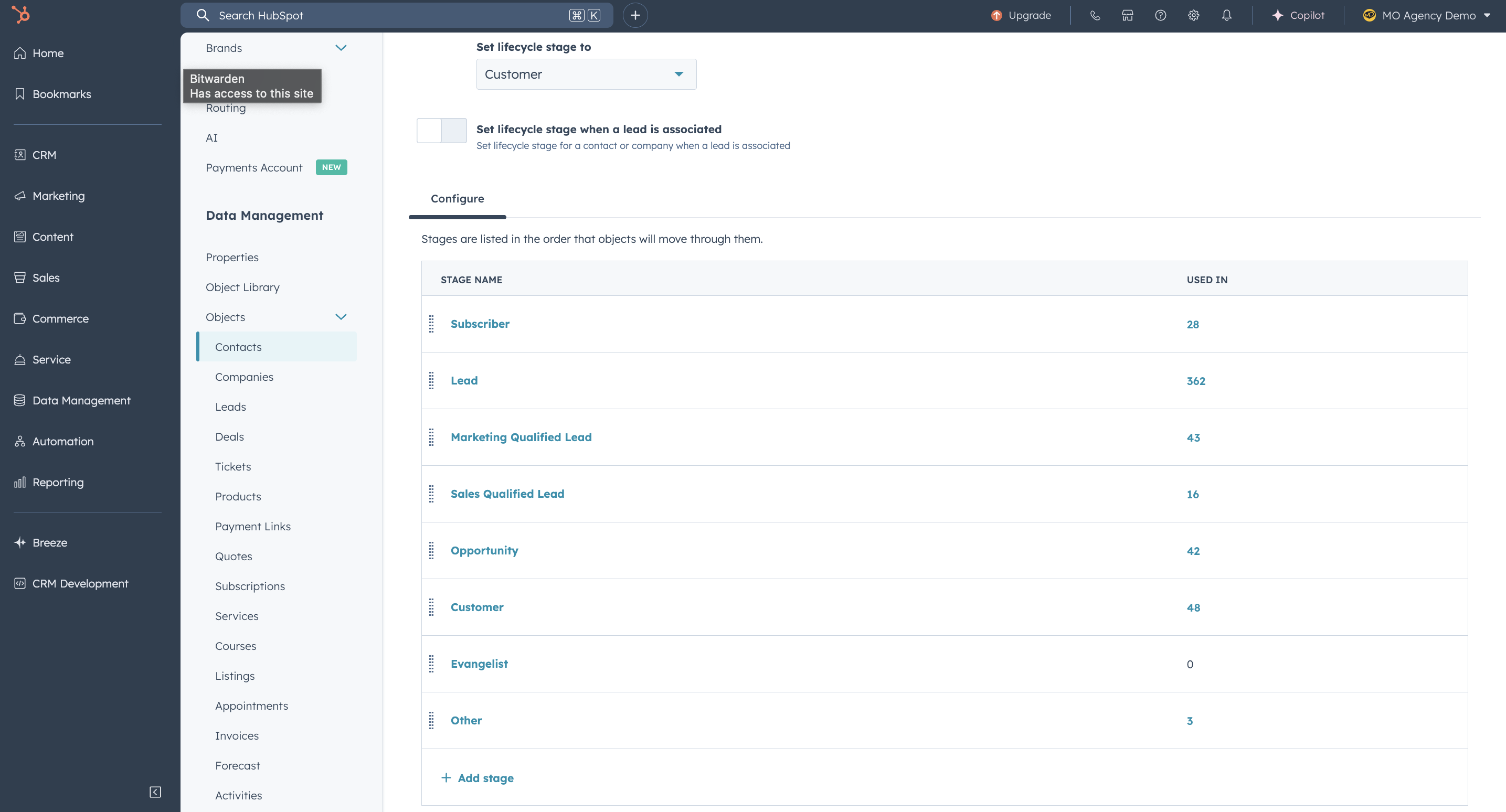
- Use HubSpot built-in lifecycle stages: subscriber, lead, MQL, SQL and customer to trigger relevant emails to match where your contacts are within their journey
- Optimise for mobile: in instances where your contacts are more engaged on mobile, ensure your email design and layout is mobile-optimised.
- Keep workflows clean and logical: Use relevant triggers, IF/THEN logic and name every action clearly.
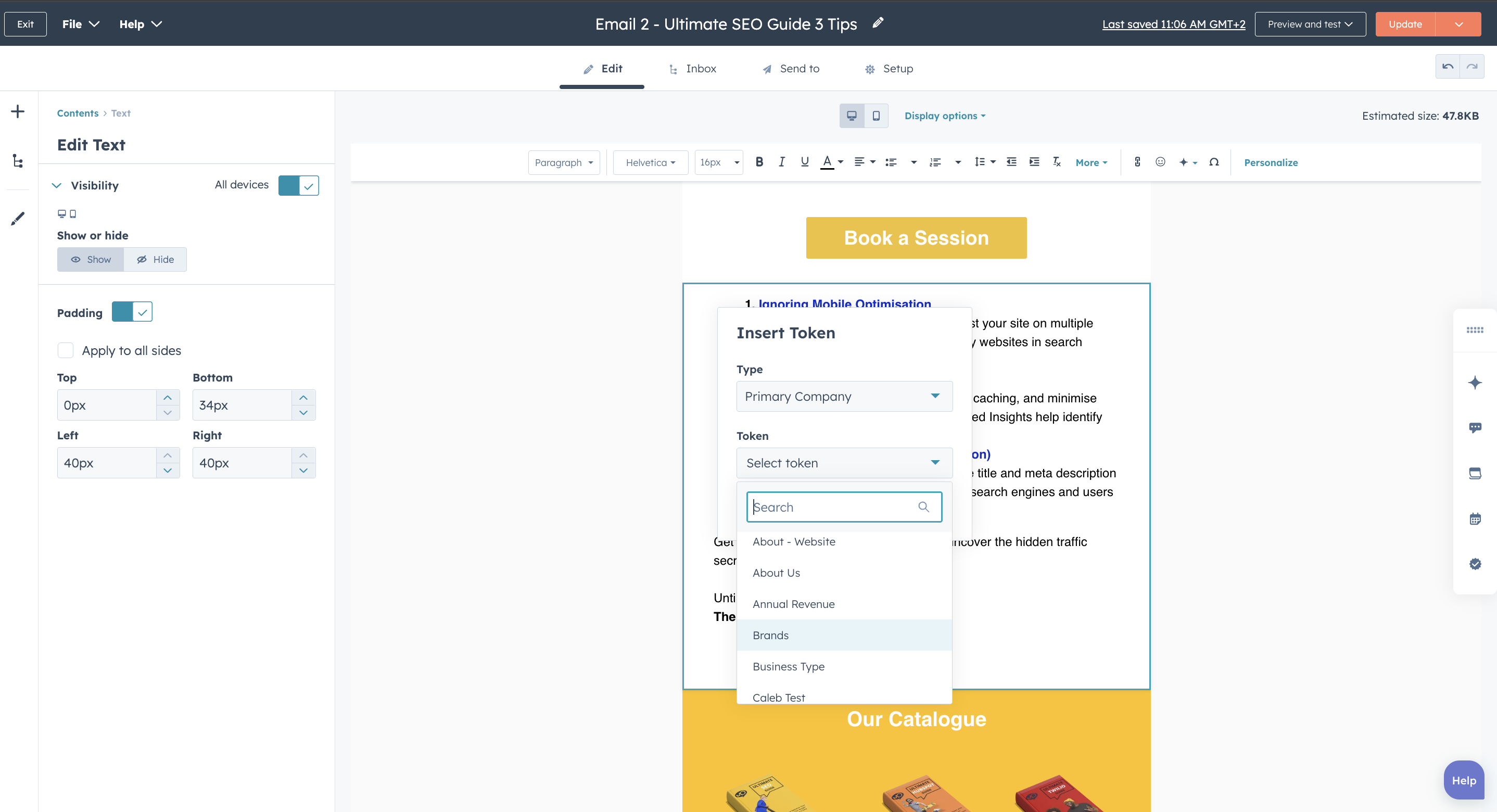
- Personalise beyond first name: use personalisation tokens over and above a contact’s first name for more tailored messaging.
- Use delays thoughtfully: give your contacts enough time to engage with and absorb information, avoid overcommunication or sending follow-up emails prematurely.
- Test everything: A/B test CTAs, subject lines and email content, as well as various workflow paths and triggers to improve performance over time.
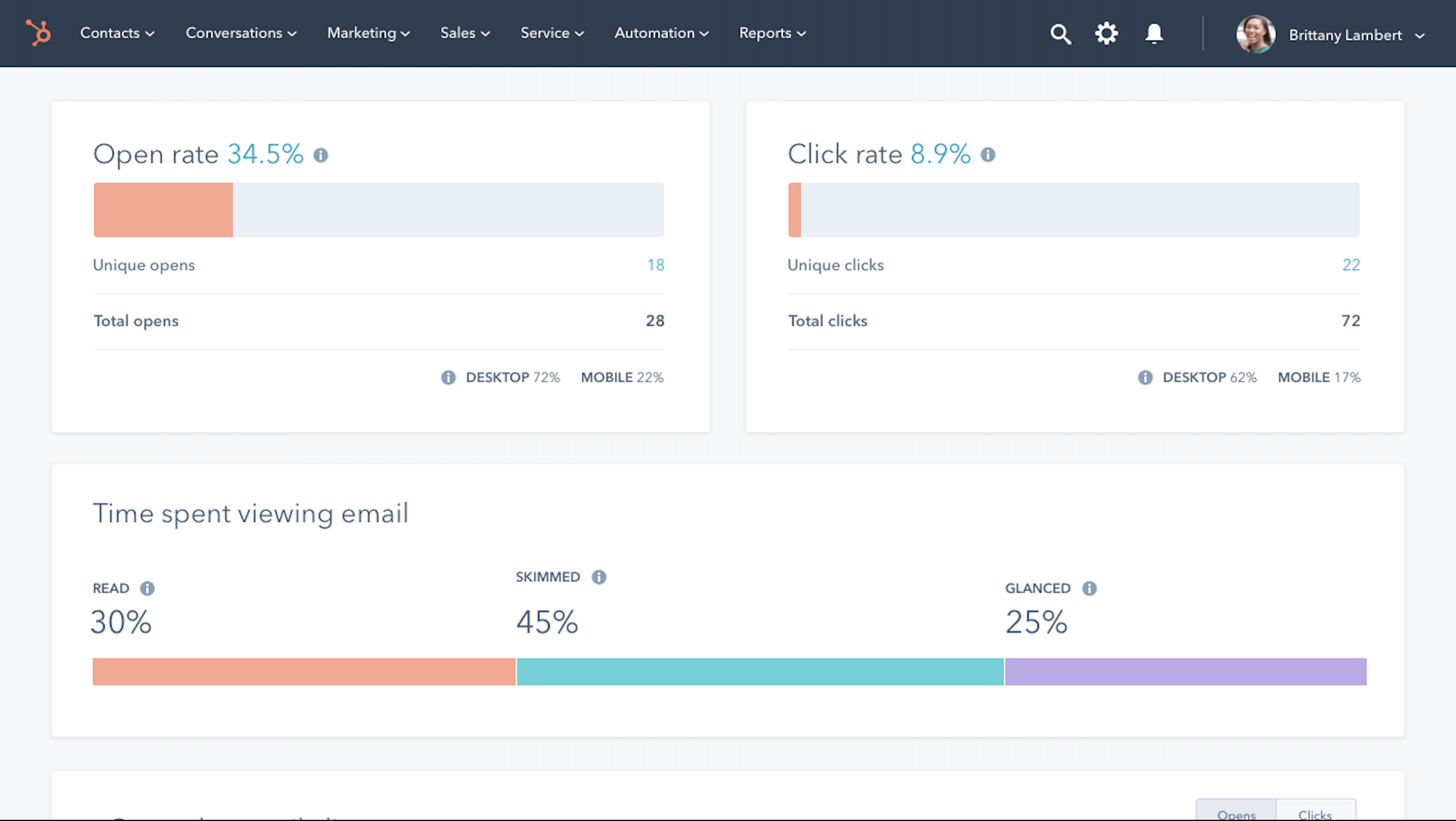
- Monitor email health metrics: use the email performance dashboard to monitor open rate, bounce rate, CTR and unsubscribe rate so that you can tailor your contact lists and email performance accordingly.
- Use workflow suppression lists: avoid overcommunication by suppressing current customers if they are already onboarding, leads that are already engaged in a nurture flow or unengaged contacts.
Making Email Automation Work for Your Business
Email automation offers real time benefits to your business. From improved conversion rates, prolonged customer engagement and saving your team time, utilising automated emails could be the ultimate game-changer for how your business interacts with its audience.
Start small, create various email templates and A/B test your efforts so that you can monitor and expand as you go.
At MO Agency, we’ve perfected the art of combining HubSpot’s powerful email automation tools with our years of industry experience and a track record in fintech, SAAS, professional services, IT & cyber security, and more to establish strategic, high-impact email automations and workflows.
Plug in our highly successful digital agency services and your HubSpot portal for email automation success.
Frequently Asked Questions
What types of emails can you automate in HubSpot?
HubSpot email automations cover a wide variety of email workflows that cater to various goals and objectives, such as: welcome emails, nurture sequences, re-engagement emails, feedback requests, internal notifications, post-purchase emails, and more.
Can HubSpot automation handle conditional logic?
Yes, HubSpot email automations facilitate both simple and complex conditional logic requirements. You can set up if/then branches to split contacts into different paths based on behavior, properties, or list membership.
How does AI improve HubSpot email automation?
Utilising various HubSpot’s AI-powered tools will help you optimise your email subject lines, generate or refine content and provide an effective workflow set up to improve performance. Additional HubSpot AI tools and features can be used to A/B tests, and track and analyse your email performance.
Does HubSpot email automation work with free accounts?
While some email automation features are available on the free HubSpot tier, automation workflows require a paid Marketing Hub subscription. This is highly recommended if scaling your email marketing efforts is important to your business.
How do I know if an email is performing well?
You can make use of HubSpot’s email performance dashboard to track open rates, click-throughs, bounce rates, conversions, and workflow goal completions. Additionally, you can use HubSpot’s email health score metrics.
Final Thoughts
Using HubSpot for email automation will not only boost productivity, but be a game changer for how you connect with your contacts throughout their customer journey. By utilising strategic workflows, behaviour-triggers and HubSpot’s AI-powered tools and insights, you can be sure that every message delivered is timely, relevant and aligned to your customer’s journey. Whether you’re looking to increase engagement, encourage more conversions or simply save time on manual email outputs, HubSpot email automation and tools are built to empower you. Start small, stay focused and build smart workflows to scale your business.
If you’re ready to unlock the full power of HubSpot email automation, let’s talk. As a HubSpot Elite partner, we bring deep expertise and hands-on experience from multiple industries to ensure your automations deliver measurable results. Contact us.