

Website design becomes much easier when you start with research, create a clear structure, set design rules early and involve the right people from the beginning.
A good process can save time, reduce confusion and make the whole project smoother for everyone involved. If you are planning a new website or updating an existing one, these five tips can help make the design process more manageable.
What makes website design easier?
Website design becomes easier when you have a clear plan before you start designing.
If you understand your audience, map out the site structure, define your visual rules, involve developers early and sketch your layouts before building, you remove a lot of guesswork from the process.
That means less back-and-forth, fewer mistakes and a better final result.
1. Do Research
Before starting any design brief, it is important to do research first as this stage will introduce you to the target market you are trying to design for. Look for references from sites that you like and use them to guide your thinking.
In this process, expose yourself to a collection of different designs and styles as this will help shape the style you will ultimately use when designing your website. Become a sponge and soak up as much as you can.
Behance is a great place to start because designers from all over the world post their work there, and there are some amazing pieces to explore.
Just remember not to clone someone else’s work. Be original and mould what you are exposed to into your own style and sense of design.
What should be included in a website design brief?
A website design brief should give the design team a clear starting point.
It should include the project goals, target audience, page structure, brand direction, content needs and any technical considerations that may affect the build.
A clear brief helps everyone understand what the website needs to achieve before design work begins.
2. Set up a site map
Setting up your site map will determine the flow of your site and assist you in determining which pages flow together and the overall journey a visitor will take on your site.
A content map does not have to be excessively detailed. A general outline is often enough to start with. Simply create a box with the page’s name, then draw a line to another page box that it connects to.
A sitemap is important because it shows how pages connect and helps define the user journey. It gives the design team a clearer view of the structure before visuals and development begin.
3. Set up your rules
Establishing rules for your website will allow you to keep a consistent flow and style throughout. It also helps other designers if they need to continue the design in your absence, leaving out the guessing games about what needs to be done.
The rules you set up should apply to font size, weight, type and similar elements. For example, the heading copy and body copy should be two different fonts that complement one another and create an interesting visual aesthetic. Fonts like Lato and Merriweather, or Montserrat and Cardo, are examples of fonts that can work well together. Visit fontpair.co for more options and variations of Google fonts that go together.
When deciding on a colour palette for your website, stick to two or three colours. Two is generally a good ratio because you do not want to overwhelm the viewer with too many colours. Do not use overly bright or sharp colours as this can hurt the viewer’s eyes, and avoid reds and bright pinks where possible. Ensure that your colour palette complements one another and creates an interesting visual flow. Google paletton.com to assist you in finding complementary colours.
Now that you have your fonts and colours sorted, you need to decide on the type of images you are going to use. Are you going to use stock photography, your own photography or vectors? This is much easier if you did sufficient research during the research phase.
How do design rules help a website project?
Design rules help keep a website consistent and easier to manage.
When font choices, colours and image styles are defined early, the design stays cohesive and it is easier for other team members to continue the project without confusion.
4. Collaboration is key
Form follows function. Always ensure that your design is practical and will work on the web.
Throughout the web design process, make sure that your website scales down to mobile, smaller screens and compressed web windows. If you are struggling, speak to a developer to ensure that your vision will be a practical build.
From experience, one of the biggest problems in web design is not engaging a developer from the conception stage. If you bring them in too late, the result can become a development nightmare. All of this could have been avoided with an early consultation.
Why should developers be involved early in website design?
Developers should be involved early because they can help identify what is practical to build and prevent problems later in the process.
When design and development work together from the beginning, the project is usually smoother and the final result is more effective.
5. Sketch out your layouts and be a team player
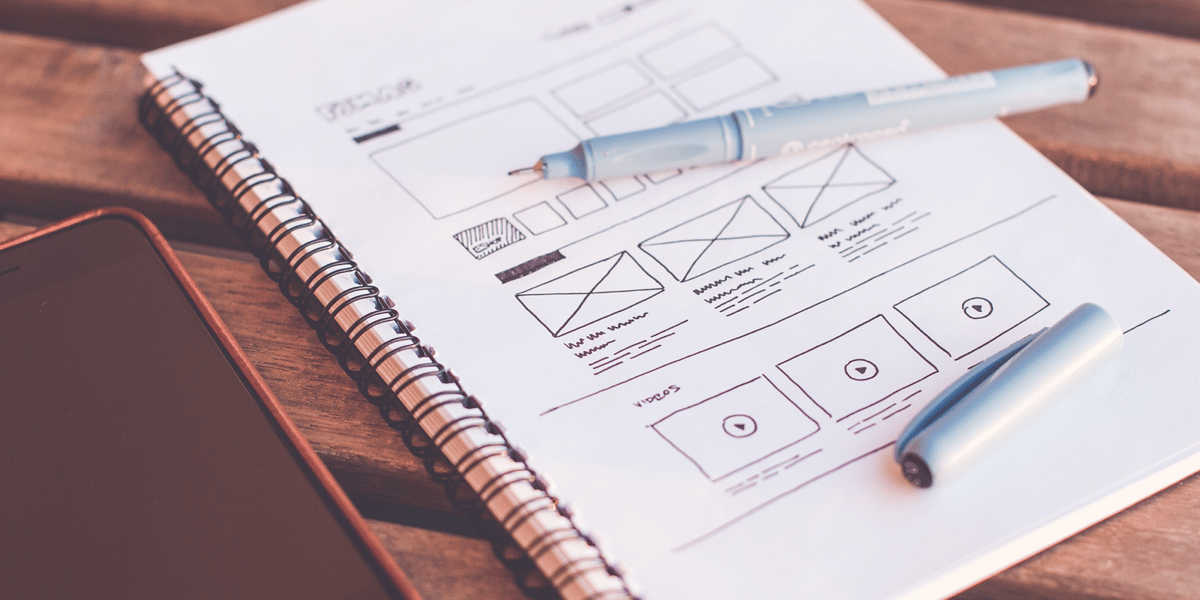
Before going into the design phase, use your content map and sketch out each page layout so that you get a feel for where content will fit and sit on your pages. Going through this process is an essential part of the journey because it gives you a general guide for how the design will look and flow. Every house starts with a foundation first.
Remember to be a team player and run your designs by others. Make sure to show people your design as you go. Doing so will help you identify any problems or issues that might arise if the work is shown to a broader audience.
You are always going to be biased when it comes to your designs, so do not fool yourself into thinking that because you like the designs, the overall design works.
How do I make a website layout easier to design?
Start by sketching the page structure before designing the full visual layout.
This makes it easier to plan where content, navigation and key elements should sit, and it gives you a clearer guide before development begins
In summary
Website design is much easier when you follow a process.
Do your research first, map out the site structure, set clear rules, involve developers early and sketch your layouts before you begin the final design. These steps help remove guesswork and make the project more manageable for everyone involved.
If you enjoyed reading through these website design tips and tricks, then you should definitely give the rest of our blog a look. We are always writing about website design and web development.
Frequently Asked Questions
What is the first step in website design?
The first step is usually research. You need to understand the audience, look at references and decide what style and structure will work best for the site.
What should be included in a website design brief?
A website design brief should include the project goals, target audience, page structure, brand direction, content needs and any technical considerations.
Why is a sitemap important in web design?
A sitemap is important because it shows how pages connect and helps define the user journey before the full design begins.
Why should developers be involved early in the design process?
Developers should be involved early because they can identify what is practical to build and help prevent problems later in the project.
How do I make a website layout easier to design?
Start by sketching the page structure before designing the full visual layout so you can plan the flow more clearly.