Our company
 Our work
 Technology
 Learn
Learn Connect


How a simple middleware application enables real-time data sync between cloud databases and HubSpot - enriching contact records and powering automated campaigns.
The Challenge
Businesses across industries — from financial services and insurance to healthcare and retail — accumulate critical data in external SQL databases.
Whether it’s credit bureau scores, policy information, inventory data, or customer risk classifications, this data often sits in cloud-hosted PostgreSQL, MySQL, or SQL Server instances on platforms like Google Cloud, AWS, or Azure.
The problem? This valuable data remains siloed from the CRM where sales, service, and marketing teams actually work.
Agents dealing with customers lack real-time context. Marketing teams can’t segment or personalise campaigns based on data that lives outside HubSpot. Every manual data transfer introduces delays, errors, and missed opportunities.
The Solution
MO Agency developed DataBridge Middleware — a boilerplate integration toolkit that we deploy in our customers’ environments to create a live, bidirectional sync between any cloud-hosted SQL database and HubSpot CRM. The solution is lightweight, secure, and requires minimal infrastructure to run.
In this demonstration, we connected a Google Cloud PostgreSQL database containing simulated credit bureau records to HubSpot CRM, enriching contact records with credit scores, risk classifications, and collection probability data — all visible to agents in real time.
How It Works
The Source Data
The demonstration uses a PostgreSQL database hosted on Google Cloud containing a table called hubspot_contact_enrichment. This table holds consumer credit records including fields like final_score, classification, reason codes, and collection probability descriptions — the kind of data a credit bureau or financial services company would maintain.
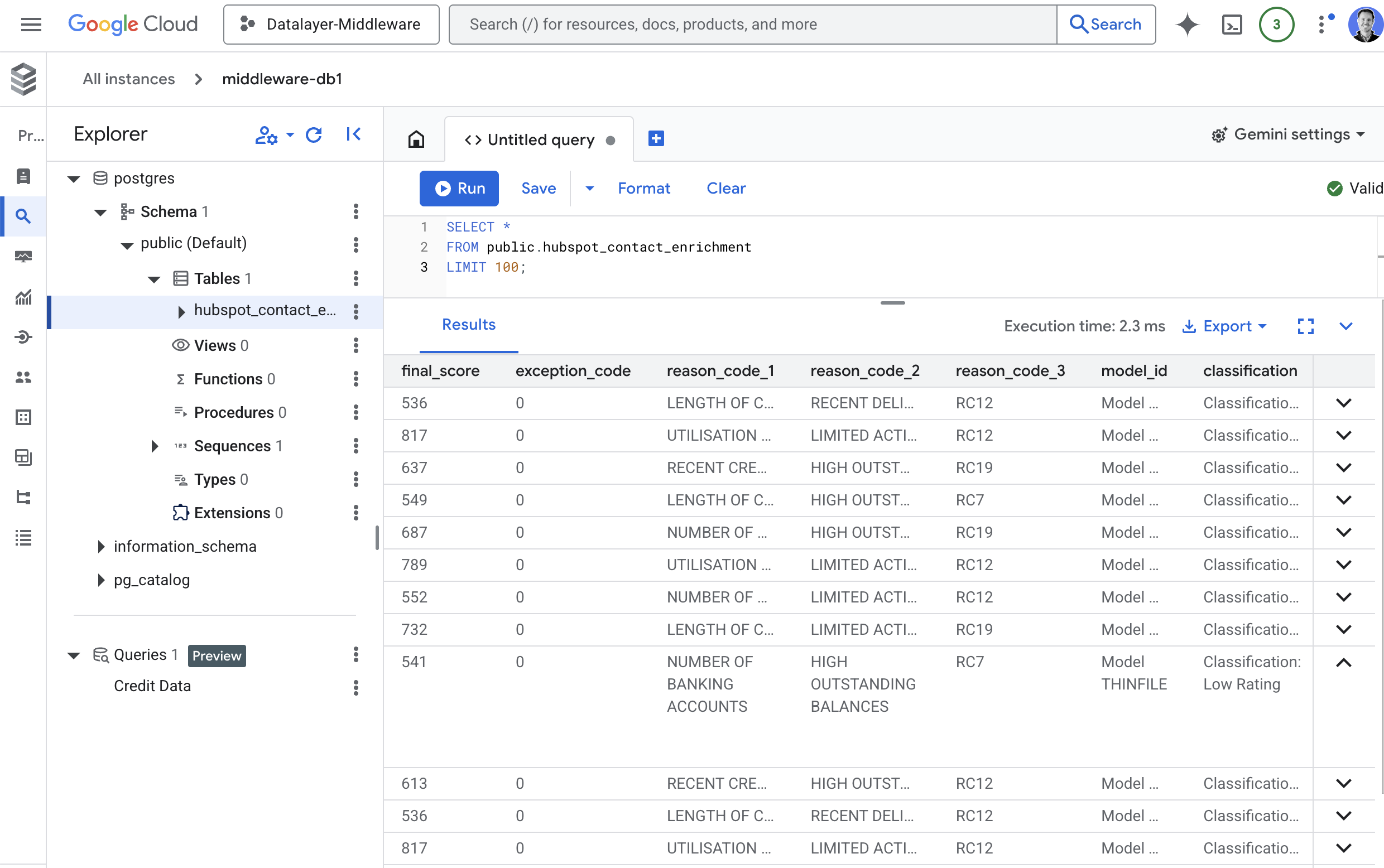
Figure 1: Source data in Google Cloud PostgreSQL — credit records with scores, classifications, and reason codes
Establishing Connections
DataBridge provides a clean interface for managing connections to both your database and HubSpot CRM. Connection credentials are stored securely and hashed. Each connection can be independently tested to verify access before any sync occurs.
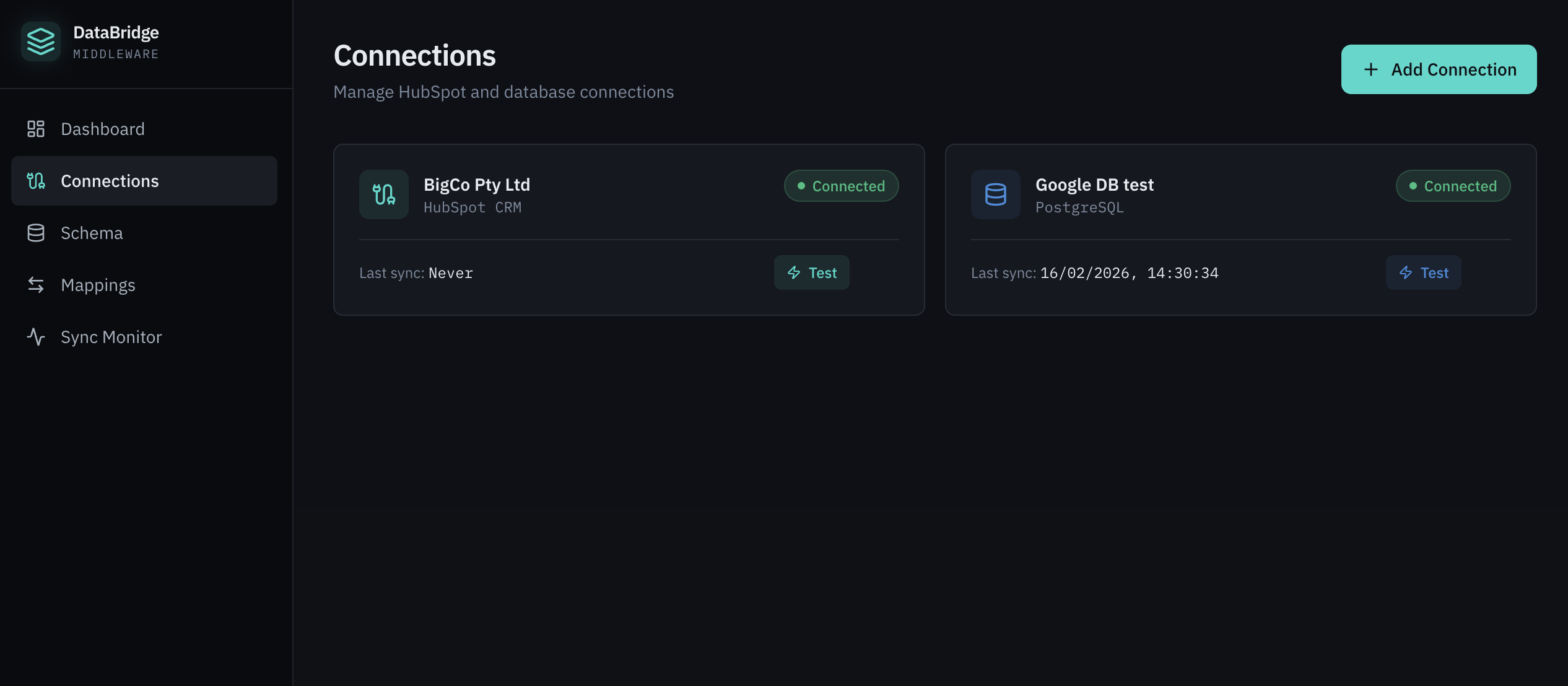
Figure 2: Two verified connections — HubSpot CRM (BigCo Pty Ltd) and Google Cloud PostgreSQL
Schema Discovery
Once connected, DataBridge automatically discovers the database schema — showing available tables, columns, data types, and nullable fields. On the HubSpot side, it exposes all CRM objects (Contacts, Companies, Deals, Tickets) with their full property sets. This makes mapping intuitive and eliminates guesswork.
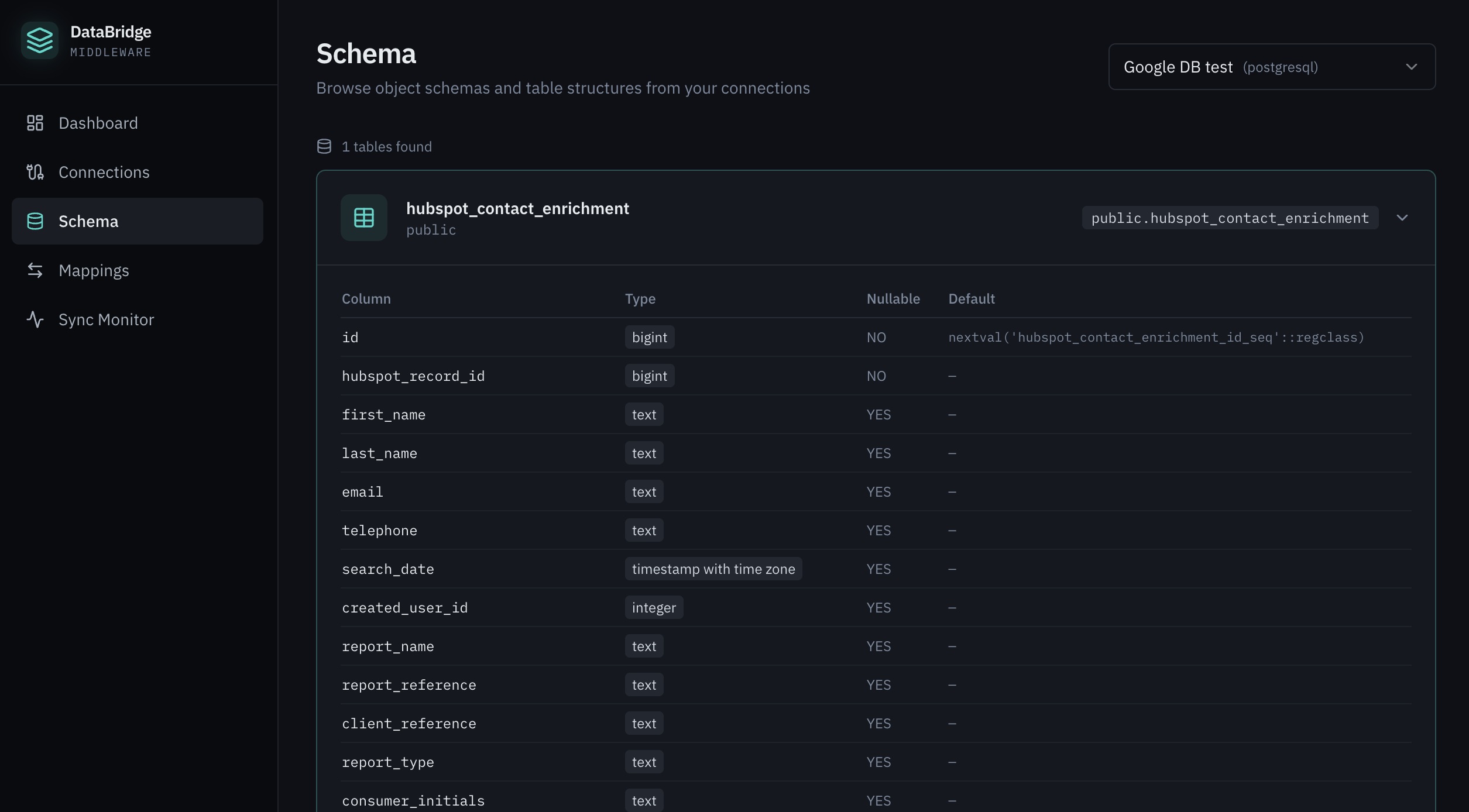
Figure 3: Database schema browser showing the hubspot_contact_enrichment table structure
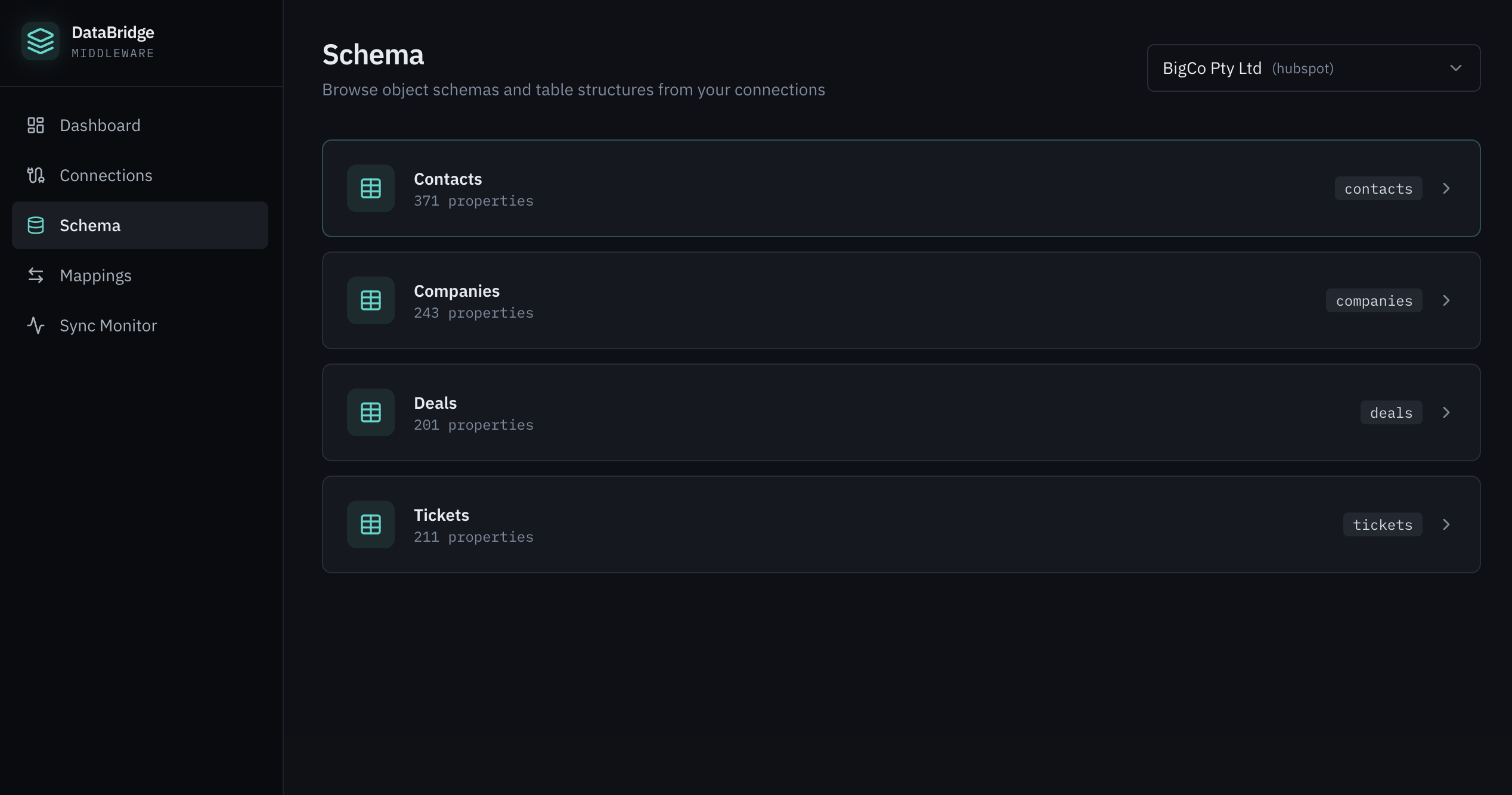
Figure 4: HubSpot CRM schema showing available objects and property counts
Field Mapping Configuration
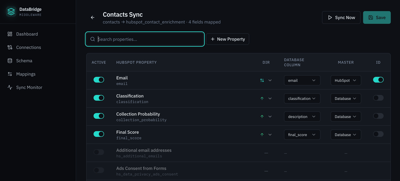
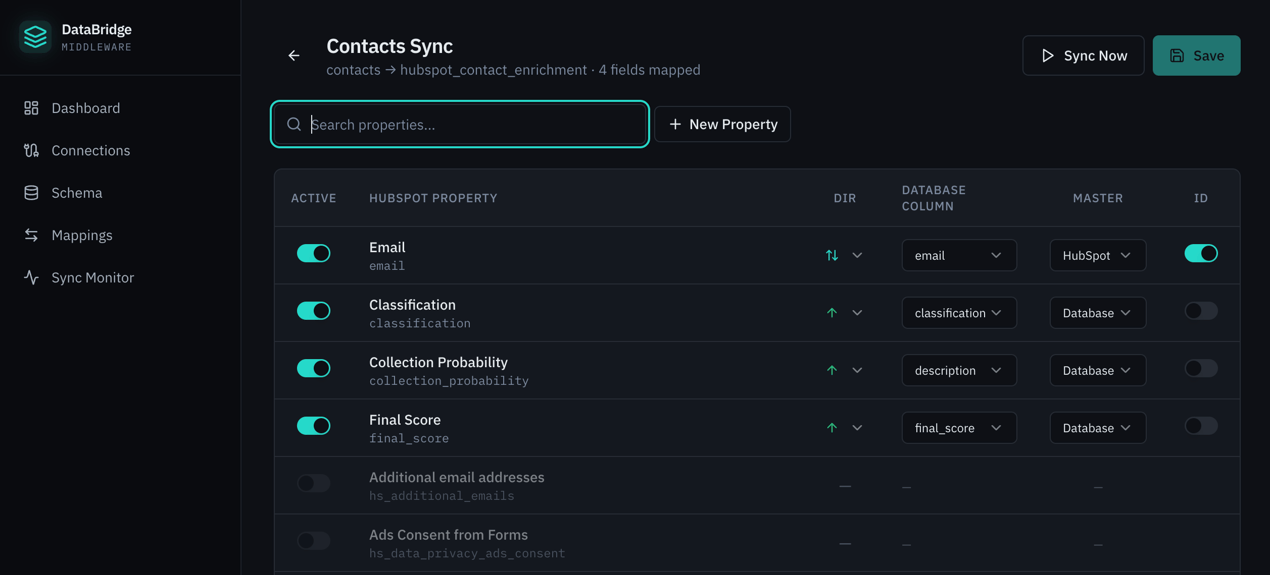
The mapping interface lets you define exactly which database columns sync to which HubSpot properties. For each mapping, you control the sync direction (database-to-HubSpot, HubSpot-to-database, or bidirectional) and which system is the master of record. Email serves as the unique identifier linking records across both systems.
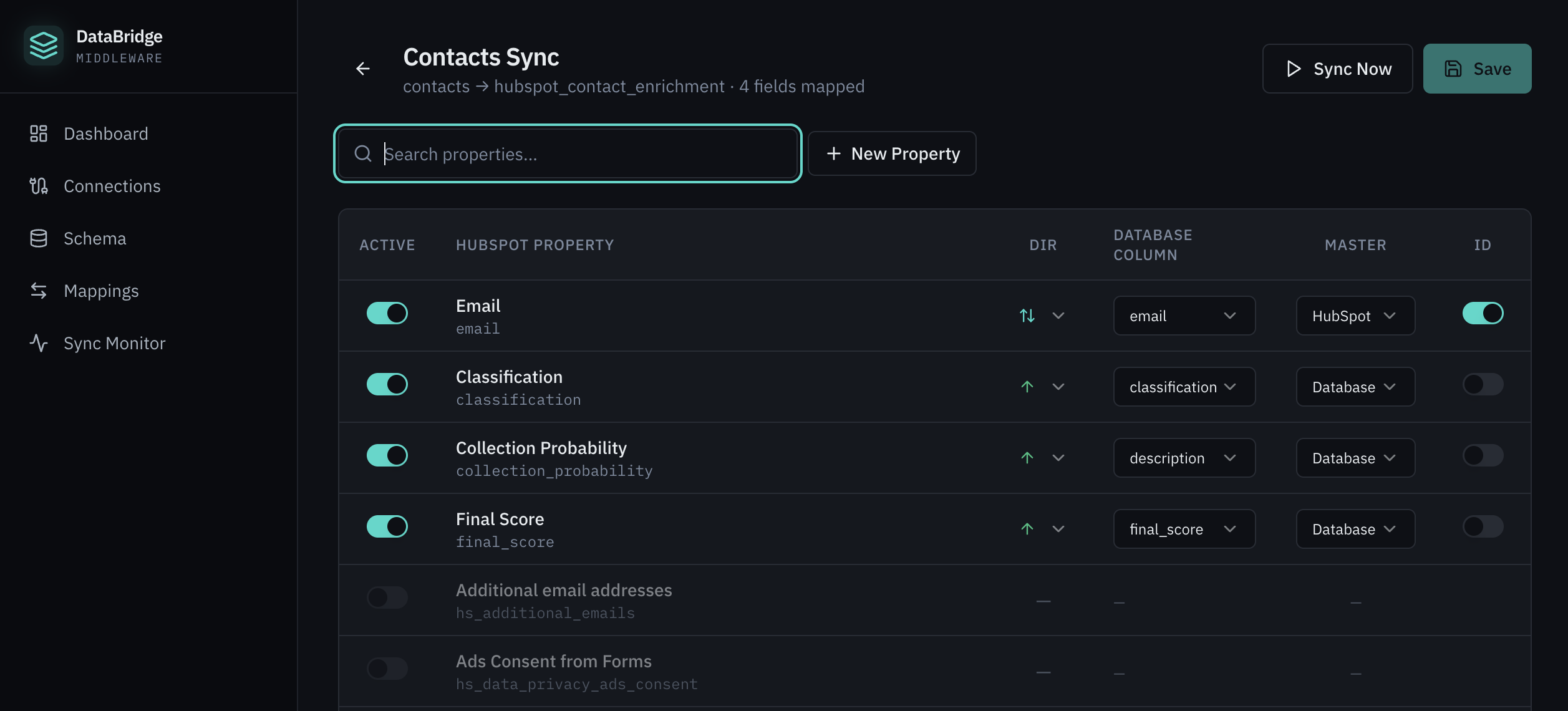
Figure 5: Detailed mapping configuration — 4 fields mapped with direction and master controls
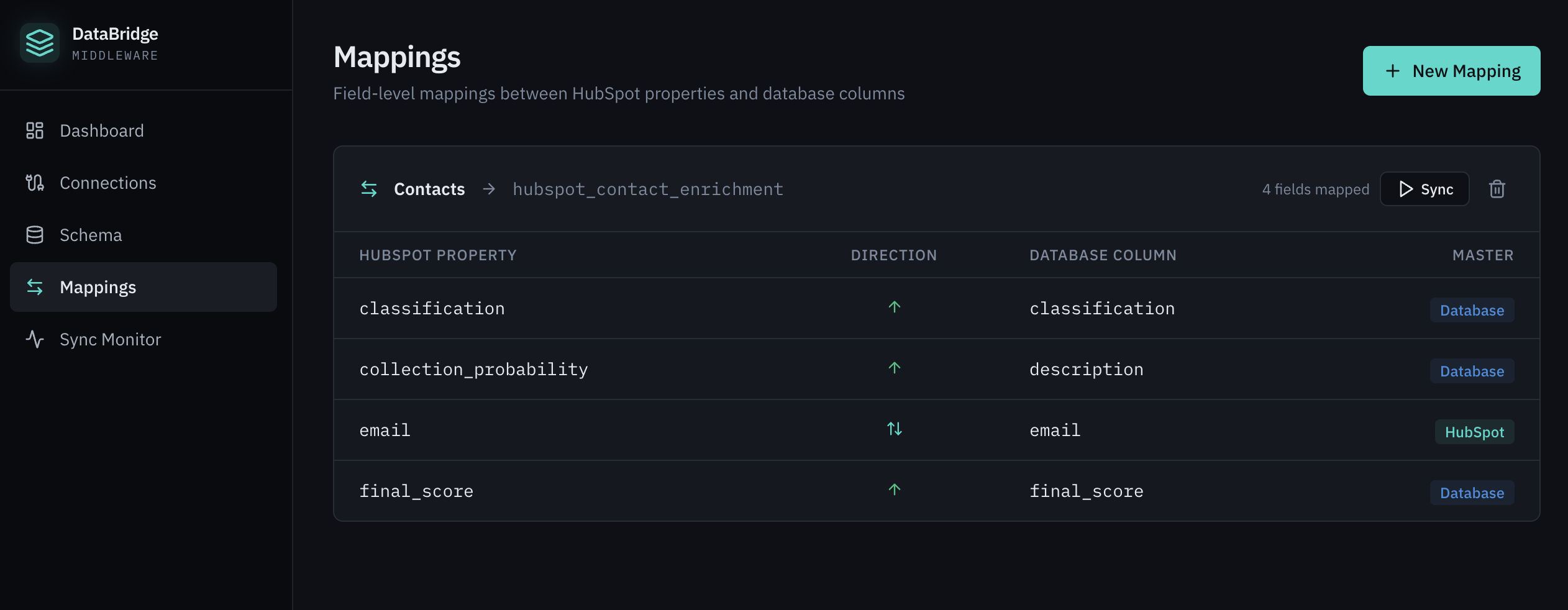
Figure 6: Mappings overview showing classification, collection probability, email, and final score
In this configuration, the database is the master for credit-related fields (classification, final_score, collection_probability), while HubSpot is the master for the email identifier.
New HubSpot properties like “Collection Probability” can be created on-the-fly directly in DataBridge when the target property doesn’t yet exist.
Sync Execution & Monitoring
Syncing is triggered manually or runs on a configurable schedule (hourly by default). The Sync Monitor provides real-time visibility into every sync event — including timestamp, record count, direction, duration, and status. The dashboard gives you an at-a-glance view of system health with metrics like average sync time and success rate.
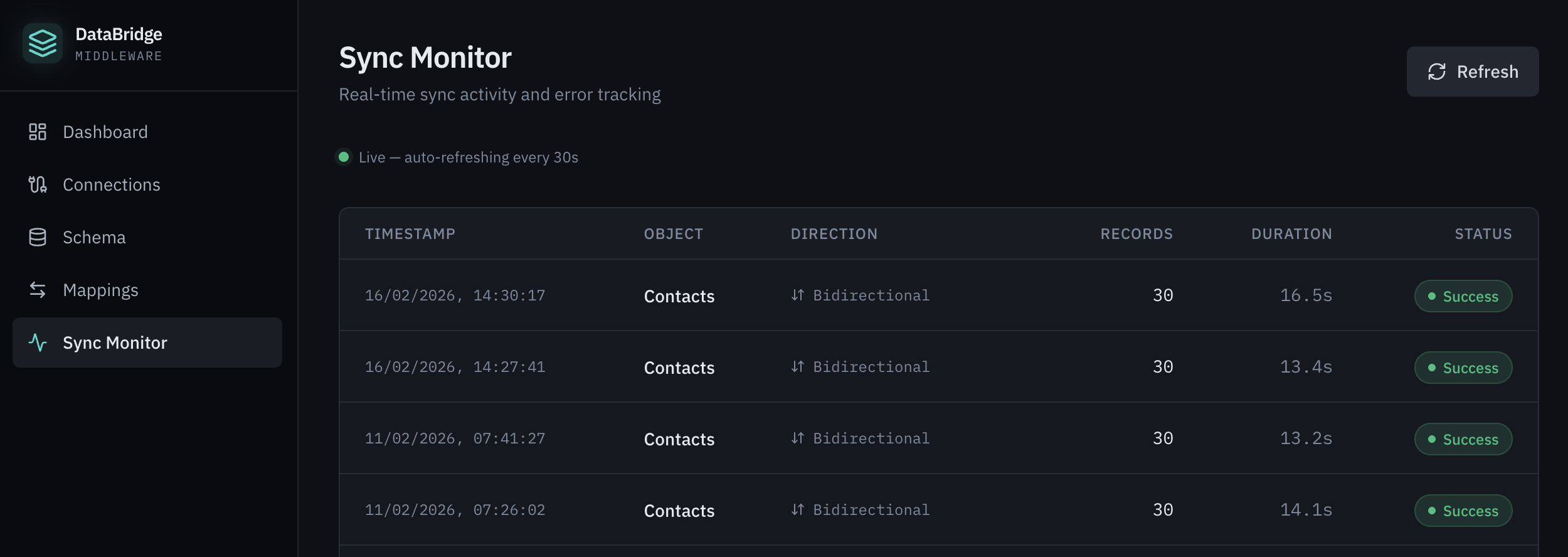
Figure 7: Sync Monitor showing successful bidirectional syncs of 30 records each
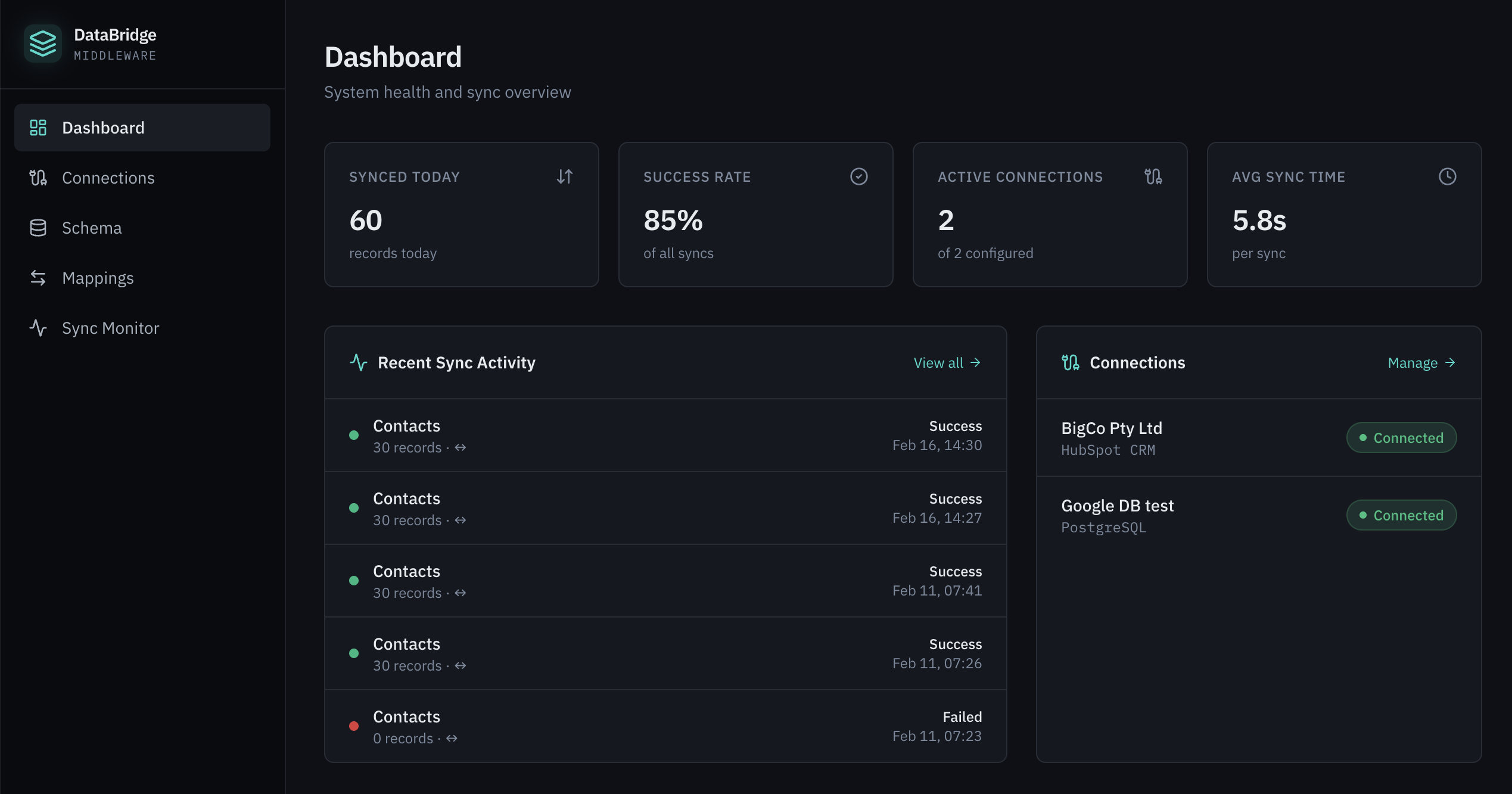
Figure 8: DataBridge Dashboard — 60 records synced today, 5.8s average sync time
The Result: Enriched CRM Data
After syncing, every matched contact in HubSpot is enriched with the external database fields. Agents can see credit scores, risk classifications, and collection probability directly on the contact record — no tab-switching, no manual lookups, no delays.
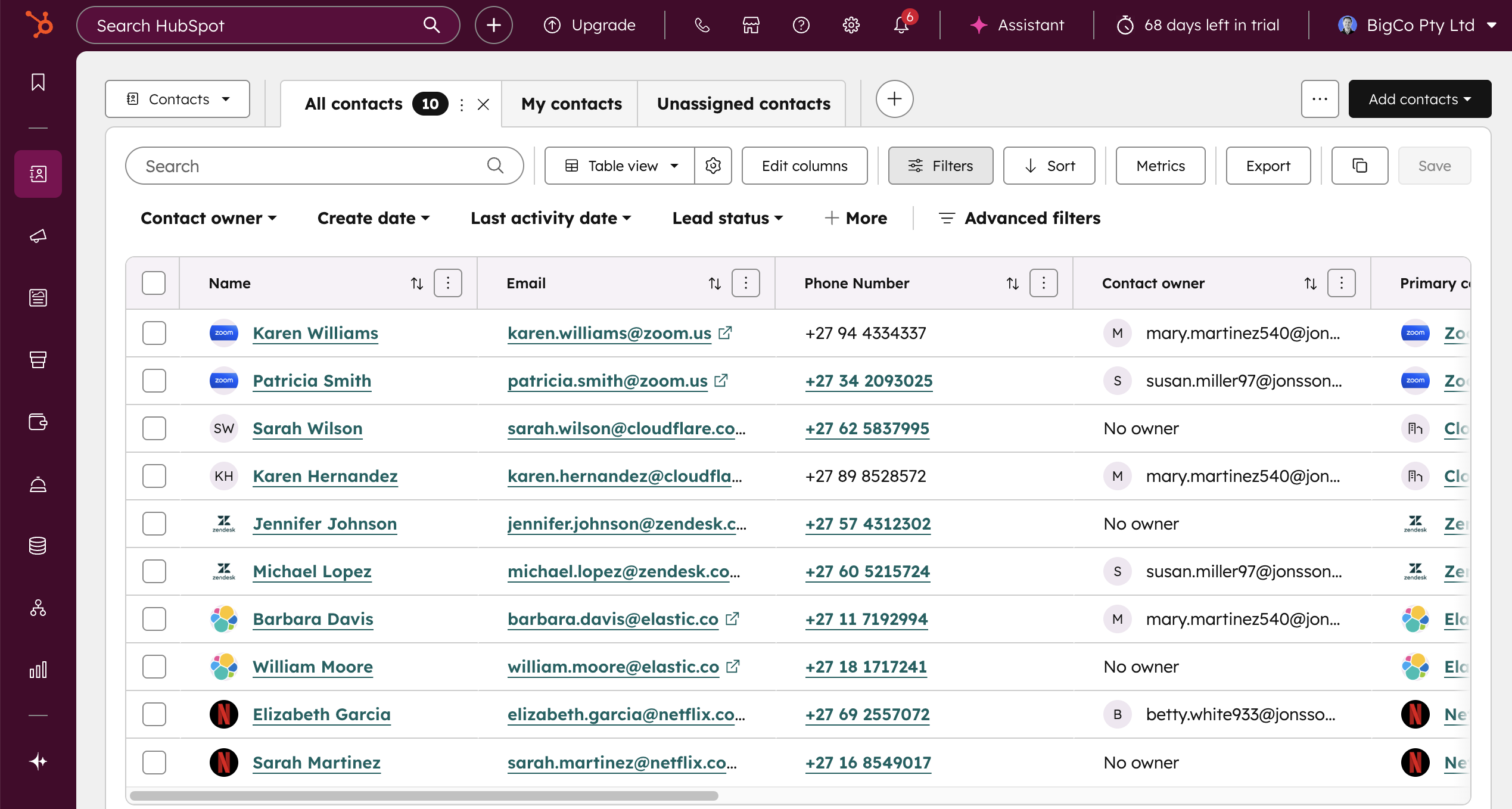
Figure 9: HubSpot Contacts view showing all 10 synced contacts with enriched data
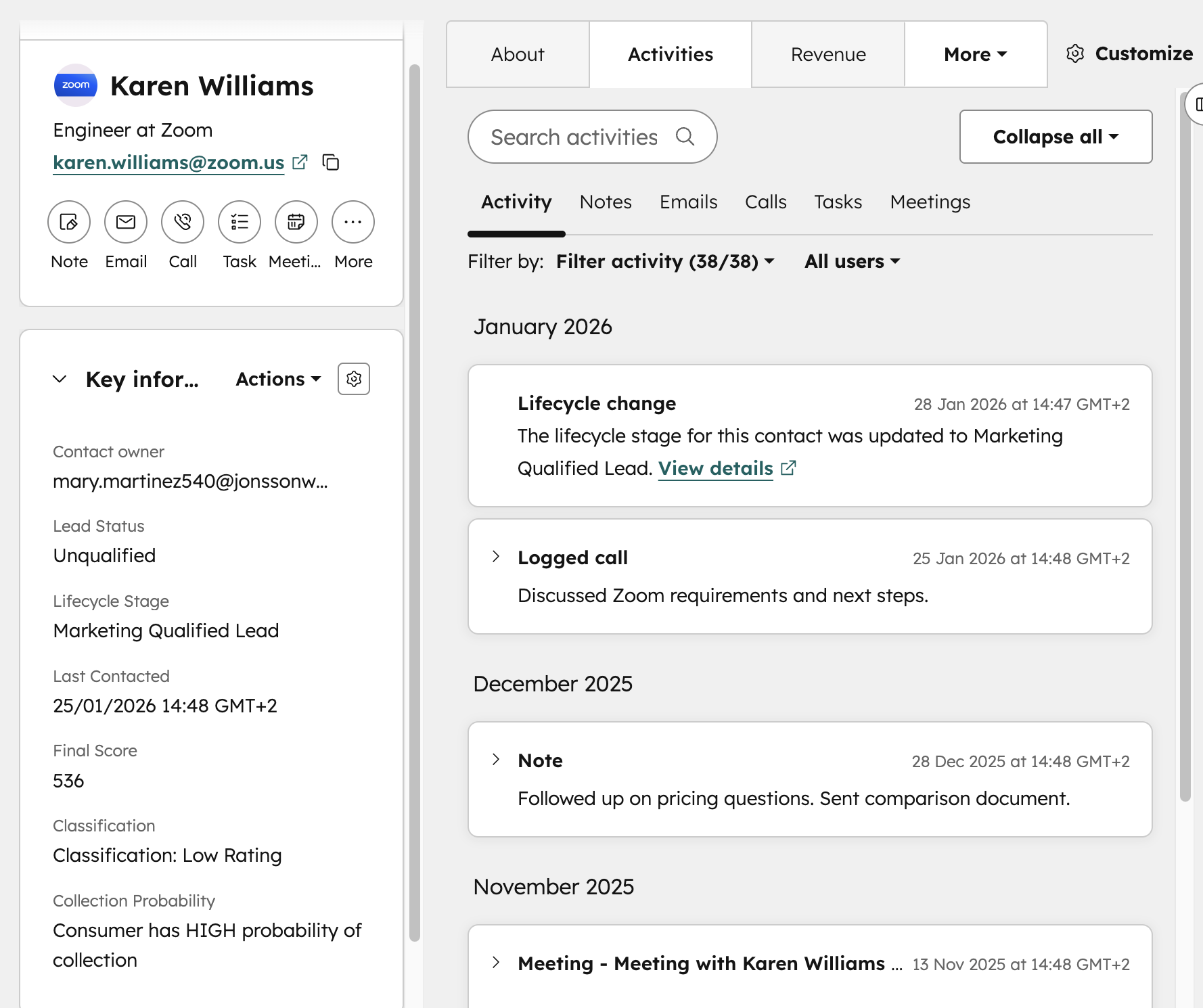
Figure 10: Contact record for Karen Williams showing Final Score (536), Classification (Low Rating), and Collection Probability (HIGH) — all synced from the database
Unlocking Automation & Segmentation
With external data now living inside HubSpot, the real power emerges. Marketing and operations teams can build active segments based on synced properties — for example, creating a “High Credit Scores” segment that automatically includes contacts with a Final Score greater than 750.
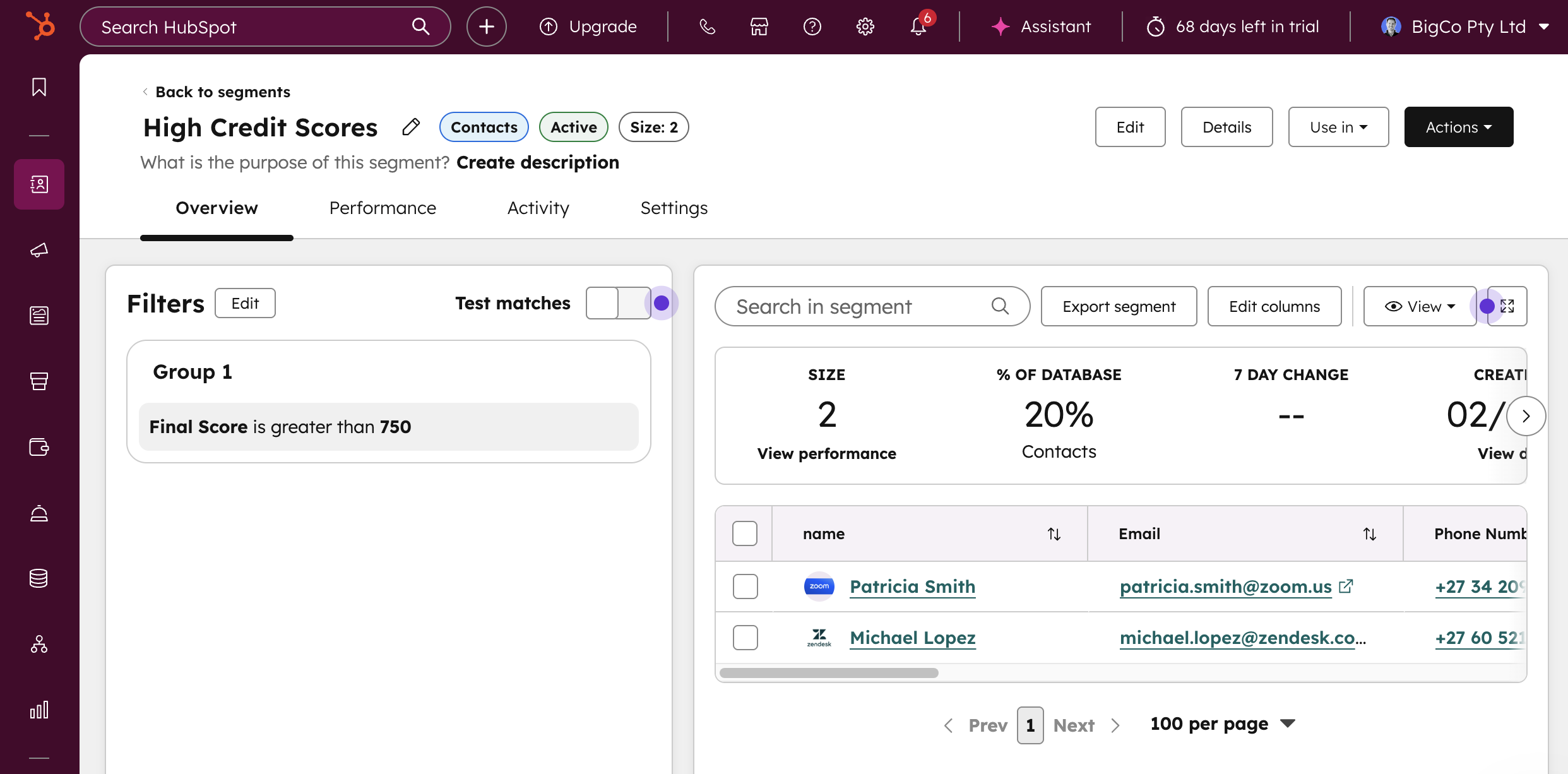
Figure 11: HubSpot active segment filtering contacts where Final Score is greater than 750
These segments power a range of automated actions: targeted email campaigns, WhatsApp messages, SMS notifications, and even paid advertising audiences. As data changes in the source database and syncs to HubSpot, contacts automatically enter or exit segments — ensuring campaigns always target the right people with the right data.
Key Capabilities
|
Capability |
Description |
|
Cloud Database Support |
PostgreSQL, MySQL, SQL Server on Google Cloud, AWS, Azure, or any cloud-hosted SQL environment |
|
Bidirectional Sync |
Configure sync direction per field — database-to-HubSpot, HubSpot-to-database, or both |
|
Master Record Control |
Define which system is the source of truth for each field independently |
|
Schema Auto-Discovery |
Automatically reads database table structures and HubSpot CRM properties |
|
Dynamic Property Creation |
Create new HubSpot properties on-the-fly when mapping fields that don’t yet exist |
|
Secure Connections |
Credentials stored securely and hashed; private query strings for database access |
|
Real-Time Monitoring |
Live dashboard with sync status, record counts, duration, and success rates |
|
Configurable Scheduling |
Set sync frequency from minutes to hours; manual sync also available |
|
Boilerplate Deployment |
Pre-built toolkit deployed in the customer’s own environment for full data sovereignty |
Industry Applications
While this demonstration uses credit bureau data, DataBridge Middleware applies to any industry where critical business data lives outside HubSpot:
- Financial Services: Credit scores, risk classifications, policy status, and claim data
- Insurance: Underwriting data, premium calculations, and claims history
- Healthcare: Patient records, appointment history, and treatment status (with HIPAA, POPIA/GDPR compliance)
- E-Commerce & Retail: Inventory levels, order history, loyalty programme data, and warehouse management
- ERP Integration: SAP, Syspro, Sage, Acumatica, or custom ERP data synced to HubSpot for a unified customer view
Get Started
The DataBridge Middleware is available free as a supported deployment through MO Agency. We provide the boilerplate toolkit, help you configure it in your environment, connect it to your database technologies, and get you running with enriched HubSpot data within days — not months.