So you've signed on the dotted line, the HubSpot license is active, and you've got that fresh new portal staring back at you. Now what?
If you're like most South African teams I've worked with over the years, the answer is usually somewhere between "we'll figure it out" and "let's just start importing contacts and see what happens". Both of those are bad ideas.
A quality HubSpot onboarding is the difference between a CRM that becomes the engine of your business and one that quietly turns into an expensive contact list nobody trusts. I've seen both, and the gap between them is enormous.
This blog is here to walk you through exactly what to expect from a HubSpot onboarding, how to prepare your team, and what we've learned running these projects for South African businesses. No fluff, just the stuff you actually need to know before you kick off.
Ready to onboard HubSpot without the guesswork?
As a HubSpot Elite Partner, MO Agency builds your CRM properly the first time - clean data, the right automation, and a team trained to run it. Get a fixed-scope onboarding quote for your business.
What is HubSpot Onboarding, Really?
HubSpot onboarding is the structured process of setting up your HubSpot portal so that it actually fits your business. It's not just clicking around the settings menu and hoping for the best.
A good onboarding covers things like:
- Configuring your CRM properties, lifecycle stages, and pipelines
- Importing and cleaning your data
- Connecting your email domain and authenticating it properly
- Setting up your sales, marketing, and service hubs based on what you actually bought
- Training your team so they don't quietly revert to the old spreadsheet
- Building the first round of automations, dashboards, and reports
You can do it yourself with HubSpot's standard onboarding (which is mostly self-guided), or you can work with a local HubSpot Solutions Partner to get tailored, hands-on help. There's no right answer here. It depends on the complexity of your business and how much time your team has to spend learning a new platform.
Why Bother With a Proper Onboarding?
Honest answer? Because the cost of getting this wrong is huge.
We've been called in to "rescue" portals that were set up in a hurry, and it usually looks the same: duplicate contacts everywhere, lifecycle stages that don't reflect reality, three different "Industry" properties (one for marketing, one for sales, one nobody remembers creating), workflows that loop back on themselves, and a sales team that has gone back to using their personal Gmail because the CRM "doesn't work properly".
That's not a HubSpot problem. That's a setup problem.
A solid onboarding gives you a clean foundation. And clean foundations save you hours of rework, cleanup projects, and uncomfortable conversations with your team a year down the line.
What to Expect From a HubSpot Onboarding
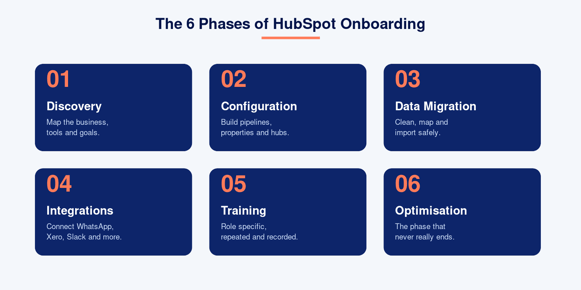
Every onboarding looks slightly different depending on which Hubs you've purchased and how complex your business is. That said, here's the general shape of what to expect.
Phase 1: Discovery and Planning
Before anyone touches the portal, there should be a proper discovery session. This is where you map out:
- Your current sales process, end to end
- The tools you're using (and which ones HubSpot will replace)
- Your reporting needs
- Your data sources and how clean they are
- Who's going to use HubSpot day to day
This phase is the unsung hero of onboarding. If you skip it, the rest of the project becomes guesswork. Spend the time here.
Phase 2: Portal Configuration
Once the plan is signed off, the build starts. Depending on the Hubs you've bought, this can include:
- CRM setup: custom properties, deal pipelines, lifecycle stages, lead statuses, and contact ownership rules
- Marketing Hub: email domain authentication, list segmentation, marketing email templates, forms, and your first automation workflows
- Sales Hub: sequences, snippets, meeting links, quote templates, and deal stage automation
- Service Hub: ticket pipelines, the help desk, knowledge base setup, and customer feedback surveys
- Content Hub: website themes, templates, and any migration work from your existing CMS
Don't expect everything to be perfect on day one. The point is to get the foundation right, not to build every clever automation you've ever dreamt of.
Phase 3: Data Migration
This is the phase that scares most people, and rightly so. Your data is your business. Mess it up and you'll feel it for years.
A proper migration includes deduplication, mapping fields correctly, preserving association history (deal-to-contact-to-company links), and making sure things like deal close dates, deal amounts, and email engagement history come across in a usable state. We've written before about how the HubSpot APIs make some of this much easier than people think.
If you're migrating from Salesforce, Pardot, Pipedrive, Zoho, or even spreadsheets, the principles are the same: clean before you import, never the other way around.
Phase 4: Integrations
Almost no business uses HubSpot as a standalone tool. You'll probably want to connect things like:
- Your accounting platform (Xero, Sage, QuickBooks)
- Your communications tools (WhatsApp, Slack, Dialpad)
- Your website forms and chat
- Your data warehouse if you have one
- LinkedIn, Google Ads, Meta, and any other ad platforms
Some of this is plug and play through the HubSpot App Marketplace. Some will need a bit of custom work via APIs or middleware like Zapier or n8n. The right approach depends on volume and how mission critical the integration is.
Phase 5: Training and Adoption
This is where most onboardings fall over. The portal is built, the data is in, the workflows are humming. And then nobody on the team actually uses it.
Training should be role-specific. A salesperson doesn't need to know how to build a marketing email. A marketer doesn't need to be deep in deal stages. Train people on what they'll actually do day to day, and give them quick reference guides they can come back to. We usually run a mix of live sessions and recorded walkthroughs, because people learn differently.
Adoption isn't a phase that ends, by the way. It's a habit. Build a rhythm of refresher sessions, especially in the first three months.
Phase 6: Optimisation
You'll go live, you'll start using it, and within a few weeks you'll find things you want to tweak. That's normal. In fact, that's the point.
Onboarding ends. Optimisation never really does. The teams that get the most out of HubSpot are the ones that keep refining their workflows, lead scoring rules, and dashboards over time.
How to Prepare for HubSpot Onboarding
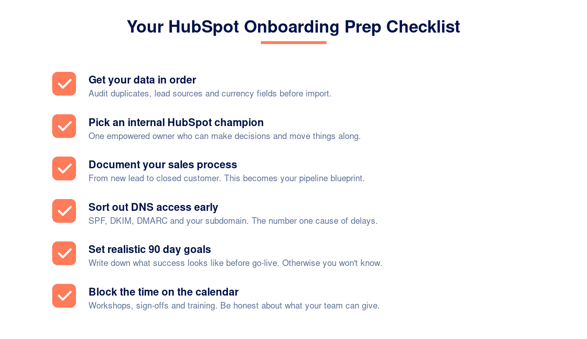
Here's the good news: a lot of the stuff that makes onboarding go smoothly is in your control. The teams that get the most out of their onboarding are the ones that come prepared.
1. Get Your Data in Order
Before you import a single contact, do an audit. How many duplicates are in your existing CRM or spreadsheet? Are your lead source values consistent, or do you have eight different versions of "LinkedIn"? Are your deal amounts in the right currency (Rand, or a mix if you sell across borders)?
Cleaning this up before the import is ten times easier than trying to fix it after. Trust me on this one.
2. Decide Who Owns HubSpot Internally
Every successful HubSpot rollout I've seen has had a clear internal champion. Someone who owns the portal, makes decisions, and is the point of contact for the implementation team. Without this, decisions stall and the project drifts.
This person doesn't need to be a HubSpot expert. They just need to be empowered to make calls.
3. Document Your Sales Process
Sit down with your sales team and actually write down how a deal moves from a new lead to a closed customer. Where does it get stuck? What are the qualifying questions? Who hands off to who?
This becomes the blueprint for your deal pipeline, and it's also a useful exercise even if you weren't getting HubSpot. You'd be surprised how often this is the first time a sales process has ever been written down.
4. Prepare Your DNS Access
You'll need to update DNS records to authenticate your sending domain (SPF, DKIM, and DMARC) and connect your subdomain for landing pages, blog content, and tracking. If your IT team or web host is going to drag their feet on this, get the request in early. This is one of the most common reasons onboardings get delayed.
5. Set Realistic Goals
What does success look like 90 days after go-live? It might be your sales team logging 100% of activity in HubSpot. It might be sending your first nurture campaign. It might be having a clean dashboard for your weekly leadership meeting.
Whatever it is, write it down. Otherwise you'll get to month three and not actually know if the project worked.
6. Block Time on Your Team's Calendar
Onboarding requires your team's input. Workshops, training sessions, sign-offs, data validation. If your CRM admin is also juggling a full time role, the project will slip.
Be honest about how much time people can give. A good partner will work around it, but they can't manufacture hours that don't exist.
What's Different About HubSpot Onboarding in South Africa
If you're onboarding HubSpot in South Africa, there are a couple of local nuances worth knowing about.
Time zones and communication. South Africa sits in a useful spot for working with both EU and US-based teams, and HubSpot's global support is solid. That said, working with a local Solutions Partner means meetings in your time zone (SAST), no waiting until 11pm for a response, and people who actually understand the local business landscape.
POPIA compliance. The Protection of Personal Information Act is a real consideration when you're setting up email subscriptions, contact properties, and consent workflows. Your onboarding partner should be thinking about this from day one, not bolting it on at the end. Things like double opt-in, lawful basis for processing, and proper unsubscribe handling all need to be configured correctly.
Local payment and integration partners. If you're integrating with Xero, Sage, Yoco, Peach Payments, or any of the local fintech and ERP players, working with a partner who's done these integrations before is a massive shortcut. We've seen too many teams burn weeks trying to figure out a niche integration that an experienced partner could have wrapped up in a couple of days.
HubSpot pricing in ZAR. HubSpot bills in USD by default, which makes budgeting fun when the Rand has a bad week. A local partner can help you think through licensing levels, contract terms, and how to get the most value out of your seat allocation.
If you want to chat about what onboarding looks like specifically in the local market, we've put together a HubSpot partner agency South Africa page that covers our approach in more detail.
Common Mistakes to Avoid
After running a lot of these projects, I've noticed the same handful of mistakes pop up again and again. If you can dodge these, you're already ahead of most teams.
Trying to do everything at once. You don't need a perfect lead scoring model, every workflow imaginable, and a 14-stage pipeline on day one. Start simple. Layer complexity in over time.
Importing dirty data. You will regret this. Always.
Skipping training because "it's intuitive". HubSpot is intuitive compared to a lot of legacy CRMs. It's not magic. Your team still needs to understand how it works and what's expected of them.
Not authenticating your email domain. This causes deliverability issues that take ages to undo. Do this properly the first time.
Choosing the wrong onboarding option. HubSpot's standard onboarding is mostly self-guided videos and check-in calls. It works for very simple setups. If your business has any real complexity (multiple regions, multiple products, custom objects, integrations), going with a Solutions Partner will save you far more than it costs.
How Long Does HubSpot Onboarding Take?
The honest answer is: it depends.
A small business onboarding onto Sales Hub Starter with clean data could be live in two to three weeks. A larger business onboarding onto Marketing, Sales, and Service Hub Professional with a Salesforce migration and custom integrations could comfortably take three to four months.
Most of our onboardings sit in the four to eight week range. The biggest variables are usually the complexity of the data migration and how quickly the client team can sign off on each phase.
Don't rush it. A few extra weeks now saves you months of rework later.
Final Thoughts
HubSpot is an extraordinary platform when it's set up properly. It can replace half a dozen tools, give your team a single source of truth, and become the engine that powers marketing, sales, and customer service in one place.
But it can also become a frustrating mess if the foundations aren't right. Onboarding is where those foundations get poured. Take it seriously, prepare your team, and pick a partner who has done it before.
If you're planning a HubSpot onboarding and want to talk through what your project might look like, get in touch with the MO team. We've onboarded everyone from early-stage South African startups to enterprise teams across the rest of Africa, the UK, and Europe, and we'd love to chat about yours.