

Your website is probably being cited in ChatGPT, Perplexity, Claude, and Gemini answers right now. Your Google Analytics 4 property almost certainly can't see most of it.
This isn't hyperbole. It's a structural measurement problem that's going to get worse before it gets better - and it's the single biggest blind spot in modern B2B marketing measurement. If you're investing in AEO (Answer Engine Optimisation), content marketing, or thought leadership, and you can't see which of that work is landing in AI-generated answers, you're flying blind on what's arguably the most important emerging acquisition channel of the next decade.
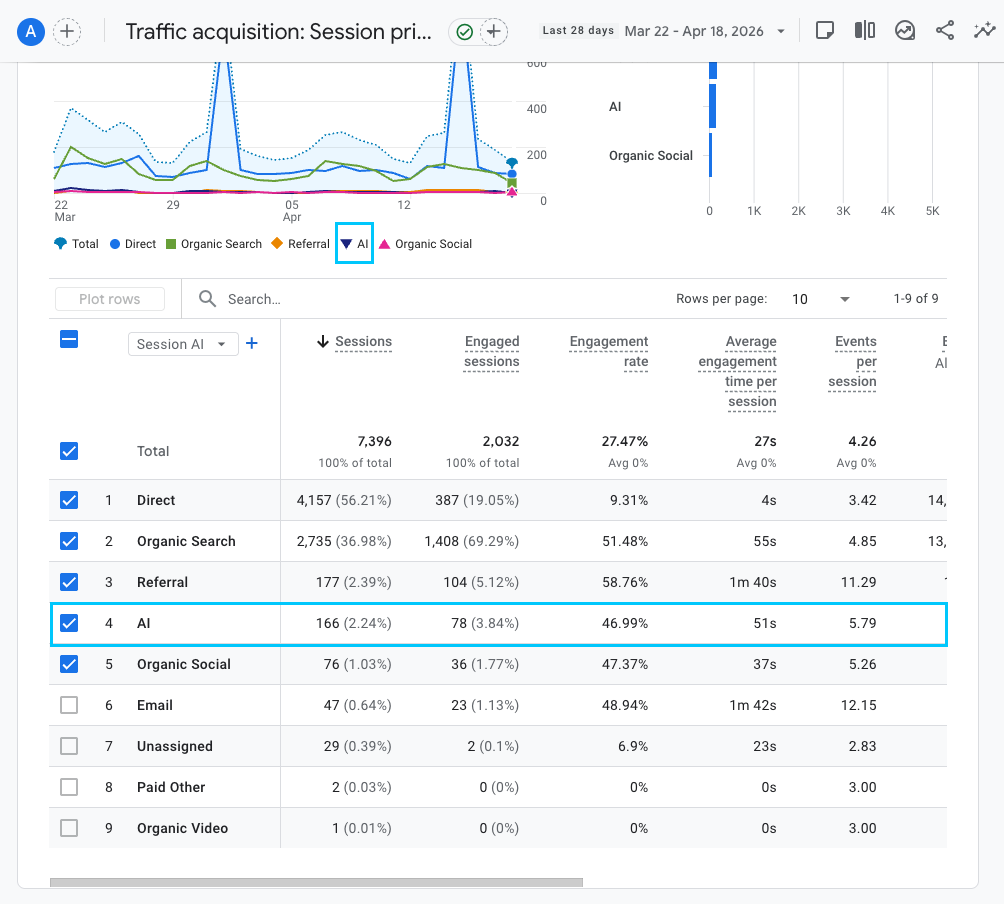
What you Google Analytics 4 will look like after you've implement this update:
So here's what's actually happening under the hood, what you can do about it today, and where the limits of even the best setup actually lie.
The AI traffic problem nobody's solved yet
GA4 was designed in a world of search engines, social platforms, and email campaigns. It has native channel definitions for Organic Search, Paid Search, Organic Social, Referral, Direct, Email, and a handful of others. There's no native "AI" channel. There's no box to tick that says "show me traffic from ChatGPT". The platform simply doesn't know what an AI assistant is.
So when a visitor reads an AI-generated answer mentioning your business and clicks through to your site, GA4 does one of three things with that session - none of which tell you the real story:
- If the AI sends a referrer header (e.g.
chatgpt.com,perplexity.ai,claude.ai), GA4 files it under generic Referral alongside forum backlinks, directory listings, and random linking domains. - If the AI strips the referrer (mobile apps, in-app browsers, certain sandboxed link handlers), GA4 records it as Direct - indistinguishable from someone typing your URL into a browser.
- If the user is exposed to your brand in an AI answer but doesn't get a clickable link, they'll Google you instead. GA4 records that as Organic Search, attributing the visit to Google when the discovery actually happened in ChatGPT.
The result: your AI traffic is scattered across three channels, largely invisible, and impossible to optimise for unless you explicitly build the attribution yourself.
Why this matters right now
A year ago, this would have been an academic problem. A tiny percent of traffic came from AI assistants. You could safely ignore it.
That's no longer true. ChatGPT alone now has hundreds of millions of weekly active users. Perplexity has become a default research tool for entire professional categories. Gemini is embedded in Google Workspace, and Copilot in Microsoft 365. The users are already there.
What's changed more recently is citation behaviour. In mid-2025, OpenAI began appending utm_source=chatgpt.com to desktop citation links, making them traceable for the first time. Perplexity cites sources consistently and passes clean referrer headers. Even Gemini now surfaces cited domains in ways that produce measurable click-throughs.
For any business investing in content, thought leadership, or technical authority - particularly in professional services, B2B SaaS, or considered-purchase sectors - AI-originated traffic is typically the highest-intent traffic on the site. These are visitors who've already been pre-qualified by an AI answer, clicked a specific citation, and landed on your page with context about what you do. In our own data across MO Agency and client sites, AI referral sessions consistently show 3-5x higher engagement rates than organic search traffic, and in the right B2B contexts, convert at 10% or more - four times the rate of non-AI sessions.
Not tracking this channel doesn't make it not exist. It just means you can't attribute the ROI of content that's working hard for you in AI answers, and you can't double down on what's winning.
What GA4 will show you natively - and why it's misleading
Before we fix anything, it's worth understanding exactly what the default reports are telling you.
Open Reports → Acquisition → Traffic acquisition in your GA4 property. Change the primary dimension to Session source / medium and search for "chatgpt", "perplexity", "claude", "gemini", or "copilot". You'll likely see rows like:
chatgpt.com / referralchatgpt.com / (not set)perplexity.ai / referralclaude.ai / referralgemini.google.com / referralcopilot.microsoft.com / referral
These are real AI citation clicks where the referrer header survived transmission. Good. You can see them. The problem is they're buried underneath genuine referral traffic from backlinks, directory listings, HubSpot staging environments, OAuth redirects, and referral spam - with no way to isolate them as a channel for reporting, comparison, or trend analysis.
More importantly, what you see here is a floor, not a ceiling. There's substantially more AI traffic that never lands in these rows at all. Here's where it goes.
What AI traffic is hidden from GA4
Four compounding structural issues mean the AI traffic visible in your default reports is a fraction of reality.
Mobile apps strip referrers
The ChatGPT iOS and Android apps open external links in your phone's system browser - but in the process, they strip the Referer HTTP header. Same story with the Claude mobile app, Perplexity's mobile app, and most chat-based AI interfaces delivered via native apps.
The session lands on your site with no source information. GA4 has no option but to record it as (direct) / (none). It looks identical to someone who heard your brand name at a dinner party and typed your URL into Safari the next morning. One recent analysis of just under 450,000 AI-adjacent visits found that 70.6% of them arrived without referrer headers and landed as Direct in GA4. That's a conservative midpoint - for consumer-facing brands where mobile AI usage skews higher, it's likely worse.
In-app browsers behave unpredictably
ChatGPT's built-in Atlas browser and similar in-app webview layers often strip or suppress referrer headers. Perplexity's Comet browser is the exception - it passes perplexity.ai as referrer cleanly - but this is rare rather than typical behaviour across the AI landscape. As more AI interfaces ship their own browsing environments, the data quality problem compounds.
Brand mentions without hyperlinks
This one is the killer and the one nobody's really solved.
When an AI assistant answers a question like "Who's the best plumber in my city?", it will often list brands without necessarily linking to each one. Even when links exist, mobile users often read the answer and then manually search for the brand name on Google rather than tap through, particularly for branded queries they can spell.
Both behaviours erase the AI origin entirely. The user Googles your brand and clicks the first organic result. GA4 records Organic Search. The user types your domain directly. GA4 records Direct. The ChatGPT conversation that started the journey disappears from the attribution chain completely.
Zero-click AI Overviews
Google's AI Overviews answer many queries inline on the search results page, without the user needing to click through to any source at all. Your content can be cited in the Overview, but if the answer is complete enough, there's no click - and therefore no GA4 event.
Google Search Console doesn't currently separate AI Overview impressions from standard organic search. The citations happen. The traffic doesn't materialise. The best you can do today is correlate Search Console query impressions with AI Overview visibility tools, but it's a proxy, not a measurement.
How to build a custom AI Search channel in GA4
With the limitations clear, here's the practical fix. What follows is a step-by-step walkthrough of creating a custom channel group in GA4 that isolates AI referral traffic as its own channel. It won't recover the dark traffic we just described, but it will surface every AI session where a referrer is passed - which is still the majority of desktop AI traffic and the cleanest benchmark you can build against.
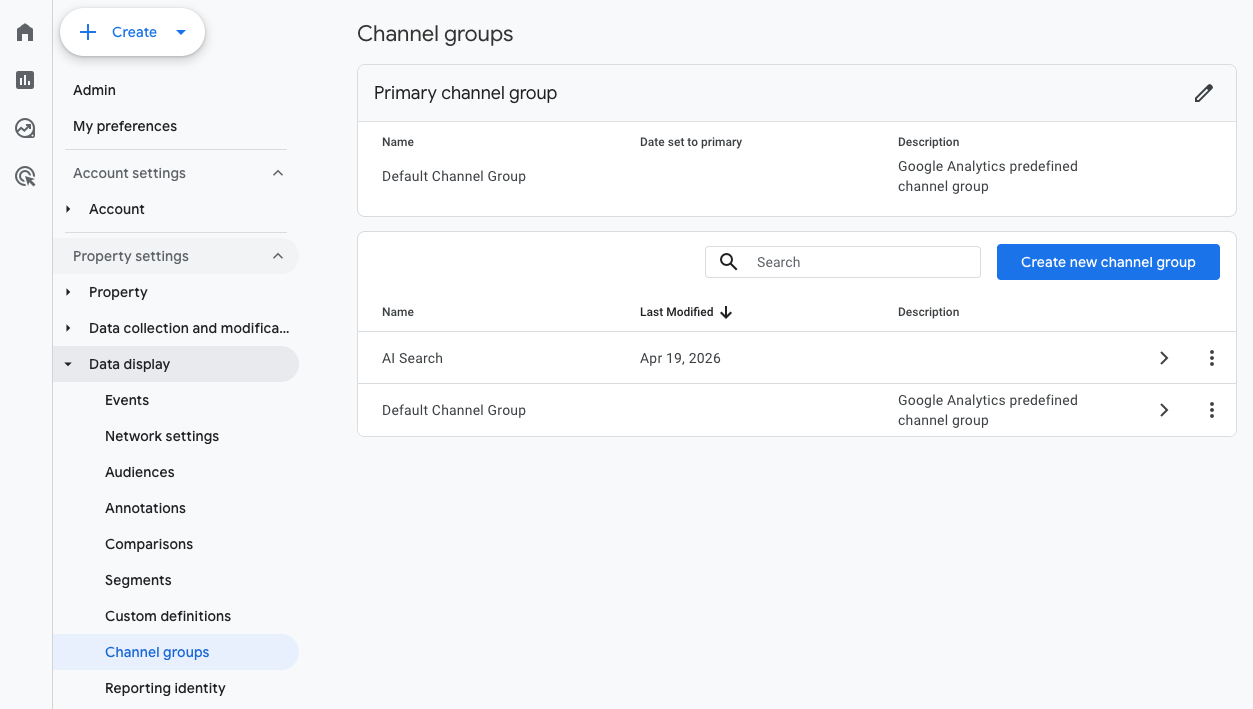
Step 1: Create a new custom channel group
- In GA4, click Admin (the cog icon, bottom-left).
- Under Data display, click Channel groups.
- Click Create new channel group (top right).
- Give it a name - we use AI Search at MO Agency - and optionally a description.
Step 2: Add the AI channel with regex matching
- Click Add new channel.
- Name the channel AI Search.
- Under conditions, set a single rule:
- Dimension: Source
- Match type: Matches regex
- Value:
chatgpt\.com|chat\.openai\.com|perplexity\.ai|claude\.ai|gemini\.google\.com|copilot\.microsoft\.com
- Leave the medium unrestricted. Constraining to
medium = referralwill cause you to miss theutm_source=chatgpt.comclicks that come in aschatgpt.com / (none)orchatgpt.com / (not set)- which in our experience represents around 30-40% of visible ChatGPT traffic. - Click Save channel.
Step 3: Get the channel order right (this is where most teams break it)
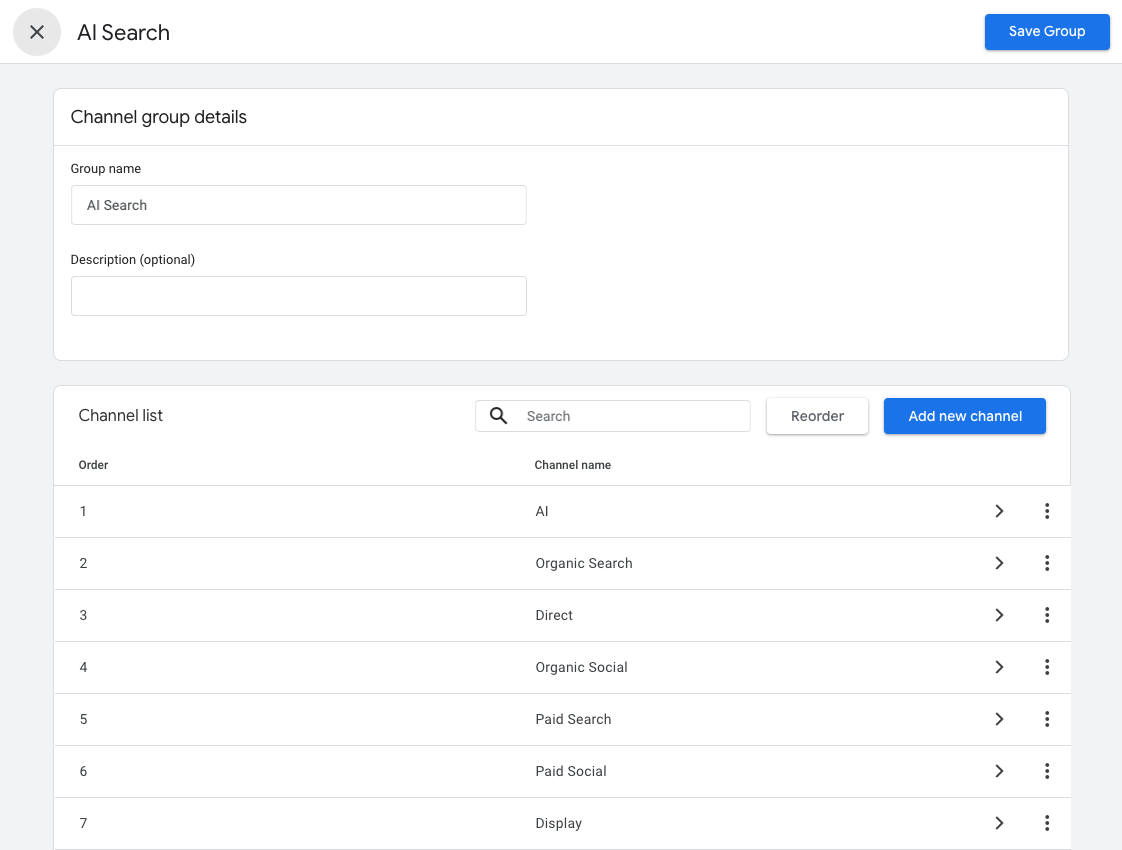
This is the step that trips up almost every tutorial you'll find online. GA4 evaluates channel rules top to bottom - the first matching rule wins. If your new AI Search channel sits below Referral or Organic Search in the channel list, those broader rules will claim AI traffic first and your new channel will never trigger.
- Back on the channel group screen, click Reorder (top right).
- Drag AI Search to the very top of the list - above Organic Search, above Direct, above Referral.
- Click Apply, then Save Group.
Rule of thumb: the most specific channels go at the top, the broadest at the bottom. Your AI regex is highly specific (a dozen named domains), so it belongs first.
Step 4: View your new channel
Allow 24-48 hours for GA4 to re-process. Then navigate to Reports → Acquisition → Traffic acquisition. At the top-left of the table, change the channel grouping dropdown from Session default channel group to Session AI Search (your new custom group). You'll now see AI Search as its own row alongside Direct, Organic Search, Referral, and the rest.
For deeper analysis, add Session source / medium as a secondary dimension to see which specific AI platforms are driving traffic, and Landing page + query string as a tertiary dimension to understand which of your pages are being cited.
Finding your shadow AI traffic
Even with the channel group built and data hygiene in place, you're still missing the Direct-attributed AI traffic from mobile apps and the Organic-attributed brand-name searches. There's no way to fully recover this, but there are two heuristics that get you within striking distance of the real number.
The deep-page Direct proxy
Create a GA4 Exploration with the following configuration:
- Dimension: Landing page + query string
- Filter 1: Session default channel group exactly matches
Direct - Filter 2: Landing page does not contain your homepage URL
- Filter 3: Landing page does not contain obvious direct-intent paths (contact, pricing, /demo)
- Metric: Sessions, Engagement rate, Average engagement time
This exploration shows Direct-attributed sessions landing on deep internal pages. Real "typed URL" direct traffic overwhelmingly lands on the homepage - nobody types yourcompany.com/blog/crm-implementation-guide-for-enterprise into a browser from memory. Deep-page Direct traffic is almost exclusively either:
- AI-originated clicks where the referrer was stripped
- Shared links from private channels (Slack, WhatsApp, email) that don't pass referrer data
- Mobile app clicks from social or AI platforms
For B2B properties without a large paid-social footprint, 60-80% of this deep-page Direct bucket is realistically AI-originated. Tracking its trend over time alongside your visible AI Search channel gives you a defensible estimate of your true AI traffic.
Correlation analysis with AI visibility tools
If you're using an AEO monitoring tool - we use Profound across MO Agency and client work - you have independent data on how often your brand appears in AI-generated answers, across which topics, in which geographies. If your Profound mention volume climbs 30% month-over-month and your Direct + AI Search channels both climb in lockstep, you've established AI causation even without clean session-level attribution.
This is the modelled-attribution approach. It's imperfect, but it's defensible enough to build internal reporting and budgeting decisions around.
Turning AI traffic data into AEO strategy
Once the measurement is working, the strategic layer opens up. A few things to look for:
Which pages are being cite? Your landing page breakdown within the AI Search channel tells you exactly which content is earning AI citations. Usually it's a small handful - typically 10-20% of your content drives 80% of AI citation clicks. Those pages deserve ongoing optimisation, refresh cadence, internal linking reinforcement, and distribution effort. The rest is less important.
Which AI platforms are your audience using? The source/medium breakdown within AI Search reveals the platform mix. Heavy ChatGPT share suggests your audience leans generalist and broad. Heavy Perplexity share skews technical and research-oriented. Heavy Gemini share often correlates with enterprise Workspace environments. Claude is still a small but growing slice, typically more technical. Tailor content formats to the platforms driving your traffic.
How engagement differs by AI source? In our data, Perplexity-referred sessions consistently show higher engagement than ChatGPT-referred sessions - users arrive having read a more structured answer and are readier to go deep. If your content is pulling strong Perplexity traffic but weak engagement, you have a landing-page match problem rather than a citation problem.
Bing organic as a Copilot proxy? Watch your bing / organic channel. Copilot grounds many of its answers in Bing's search index, so unusually strong Bing organic traffic often correlates with Copilot citations that never attribute cleanly. If Bing organic climbs while Google organic is flat, you're likely earning Copilot visibility.
A measurement stack that actually works for AEO
Combining the pieces, a realistic AEO measurement stack for B2B teams today looks like this:
GA4 with a custom AI Search channel group and clean data hygiene - your session-level tracking for visible AI traffic and your baseline for trend analysis.
An AEO monitoring tool like Profound - your independent data on brand visibility in AI answers, citation frequency, and topic coverage.
Google Search Console - your proxy for AI Overviews visibility via query impression data.
Cloudflare (or similar edge) logs - your fallback for capturing data that never reaches GA4, particularly useful for properties running AI-readable markdown layers where AI crawler traffic has strategic value in its own right.
A blended dashboard in Looker Studio or similar combining all four sources with consistent date ranges, allowing you to connect AEO inputs (mentions, citations, content output) to measurable business outcomes (sessions, engagement, conversions).
No part of this stack is free of limitations. Together, they represent the current state of the art for measuring something that the core analytics platforms still don't natively understand.
The bottom line
If you do nothing else after reading this, build the AI Search custom channel group in GA4 using the regex and ordering described above. It's 15 minutes of work, and it gives you visibility you don't have today - visibility that gets cleaner with every week of fresh data flowing through it.
The larger point is this: AI search is not a future channel. It's a present channel your customers are already using to discover and pre-qualify your business. The teams who start measuring it in 2026 - however imperfectly - will have a 12-24 month head start on the teams who wait for GA4 to build a native AI channel. If you're serious about content, thought leadership, or AEO as a category of work, the measurement layer has to get built now.
MO Agency helps enterprise and growth-led businesses measure, optimise, and scale their AI search visibility. If you'd like us to audit your GA4 setup for AI attribution readiness, build a blended AEO measurement dashboard, or architect an AEO content strategy around actual citation data.