

In my experience as a HubSpot Strategist, having onboarded many businesses to the Marketing Hub, I’ve found that many marketing teams are tied down with manual, repetitive tasks.
Rather than strategically scaling their marketing efforts, they are wasting valuable hours on routine tasks such as sending individual emails and updating lead records manually. They end up chasing leads with minimal results. Marketing automation is the key to overcoming these barriers as it empowers businesses to drive personalised engagement at scale. So the marketing team spends less time on mundane tasks and more time creating value.
As a leading all-in-one platform, HubSpot brings marketing automation capabilities into one place, integrated with its CRM for a seamless handoff to Sales and Service teams.
MO Agency is an Elite HubSpot Partner and specialises in implementing and optimising these automations to ensure that you get the most out of your investment from day one. Thus, in this guide, I’ll explore HubSpot’s marketing automation capabilities in detail and how they can add considerable value to your business.
What You’ll Learn in This Guide
- Build automations fast with user-friendly workflows, branching, and if/then logic.
- Prioritise sales-ready leads using property + behaviour scoring with automated hand-off.
- Personalise at scale with Smart Content, segmented lists, and Smart CTAs.
- Send emails that convert by means of welcome, drip, and nurture sequences. Then refine these emails through A/B testing and real-time metrics.
- Create campaigns across email, social, and web with unified reporting and journey tracking.
- Use HubSpot’s AI for smarter send times, content suggestions, and decision-making.
What is Marketing Automation?
Marketing automation refers to software tools designed to automate repetitive marketing tasks, such as sending follow-up emails, scheduling social media posts, and performing lead scoring.
One of marketing automation's primary benefits is that it enables businesses to deliver personalised communication at scale within a fraction of the time.
Beyond saving time, automation offers several additional benefits:
- More reliable campaigns
- Higher conversion rates
- Improved collaboration between marketing and sales teams
- Deeper audience segmentation
- Faster lead response times
Furthermore, according to HubSpot research, companies using automation experience a 451% increase in qualified leads and report a 10% or greater revenue increase in 6-9 months. It also streamlines data-driven decision-making by providing real-time analytics and performance insights.
However, although numerous platforms offer marketing automation, it is important to note that the user experience and business outcomes can vary significantly. Choosing the right platform matters.
HubSpot Marketing Automation Capabilities
The marketing automation capabilities within HubSpot’s Marketing Hub offer a unified toolkit that streamlines complex marketing tasks and enables true omni-channel monitoring and engagement.
The following section will dive deeper into these capabilities by highlighting 5 core features that enable marketing teams to achieve end-to-end automation across the digital marketing ecosystem.
Workflow Automation Engine
HubSpot’s visual workflow builder enables marketers to design, automate, and optimise entire marketing processes without any coding.;
It consists of a user-friendly interface from which users can select a range of advanced workflow triggers, such as form submissions, page views, contact property changes, or specific dates.
These triggers can then be linked to actions like sending emails or issuing notifications to build end-to-end automated workflows. Additionally, the intuitive interface streamlines branching logic and if/then conditions to help simplify complex campaign paths.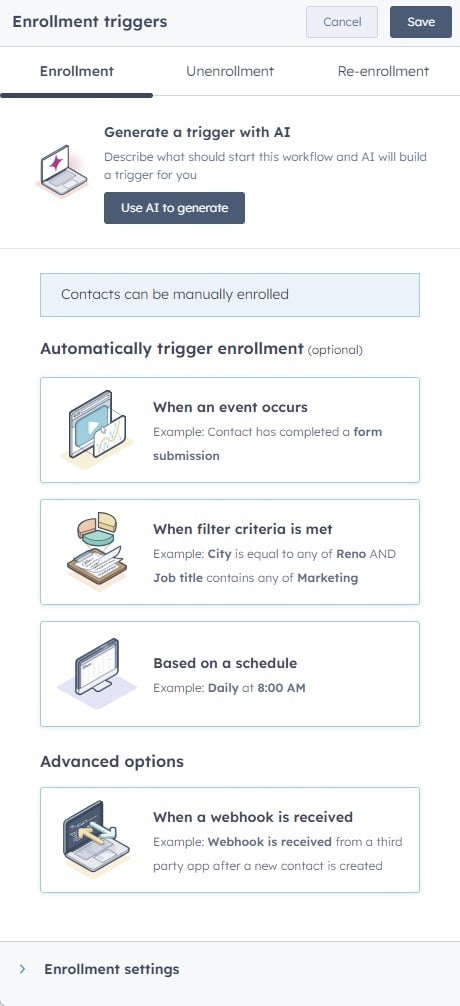
Compared to legacy automation tools that require developer resources or technical support, HubSpot’s easy-to-use canvas enables marketing teams to prototype, test, and deploy workflows in minutes.
Contextual tooltips, in-app guidance, and template libraries further simplify the setup process. This means that even beginners can launch multi-step automations with confidence and precision.
Lead Scoring and Qualification
HubSpot’s lead scoring system assigns numerical values to prospects based on contact and company properties (e.g. industry, company size, and role) and behavioural signals (such as page views, email clicks, and form submissions).
To distinguish and prioritise prospects, these two complementary lead scoring approaches can be utilised as follows:
- Property-based scoring: Identify high-quality leads by giving more weight to characteristics that match the business’ ideal customer profile.
- Behavioural scoring: Monitor engagement and prioritise actions such as sign-ups, webinar registrations, or document (e.g. brochure, whitepaper, or guide) downloads.
As contacts or companies reach predefined score thresholds, HubSpot can automatically advance them through lifecycle stages from a Marketing Qualified Lead (MQL) to a Sales Qualified Lead (SQL).
Setting this up enables you to automate real-time alerts for your sales team when a prospect is ready for outreach, thereby improving follow-up speeds and conversion rates.
The advantage of fully customisable scoring rules and periodic performance reporting is that a company can continuously refine its criteria to focus on the most promising opportunities.
Smart Content and Personalisation
HubSpot’s Smart Content feature enables the dynamic customisation of website pages, emails, and landing pages based on contact properties such as location, job title, or lifestyle stage.
This feature is further enhanced by Smart CTAs that display personalised calls-to-action that are tailored to a visitor’s persona, referral source, or previous interactions. For example:
- A first-time visitor identified as a “Small Business Owner” could see a CTA “Download Your Free Small Business Marketing Guide”.
- Comparatively, a returning contact identified as “Enterprise Manager” could see a CTA “Get Your Exclusive Product Demo”, which reflects their intent and encourages deeper engagement.
Marketers can also leverage HubSpot’s dynamic and static lists to segment contacts by demographics, engagement history, or custom criteria. This combination of segmentation and dynamic content can deliver personalised experiences, leading to stronger engagement from the target audience.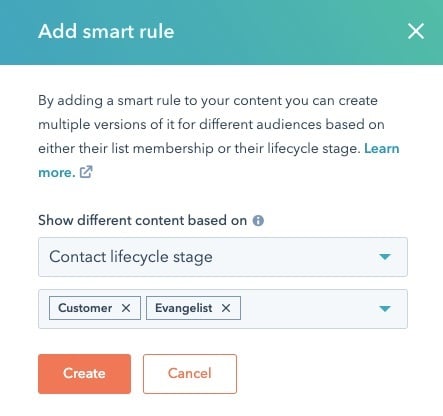
Email Marketing Automation
HubSpot enables marketers to build and deploy automated email campaigns through an intuitive editor that requires no coding experience. A few examples of the types of campaigns that can be built include.
- Drip series: A sequence of scheduled emails that gradually introduce prospects to a business’s offerings. The user can set the timing delays and engagement-based triggers that effectively nurtures the lead towards conversion.
- Welcome sequences: Automated onboarding emails sent immediately after a visitor signs up. Set personalisation tokens and conditional branches to showcase key features and guide new contacts down the purchasing funnel.
- Multi-stage nurture tracks: Cohesive workflows combining multiple decision points and email sends that adapt based on the recipient's behaviour and profile data. Here, HubSpot’s dynamic list segmentation and if/then logic can be leveraged to optimise each touchpoint.
Additionally, advanced A/B testing enables a marketer to experiment on subject lines and email content to optimise open and click-through rates. Detailed email performance tracking further enhances the user’s ability to optimise email campaigns.
HubSpot’s email templates are also fully responsive across devices, and its deliverability tools monitor inbox placement, spam scores, and domain health to maximise reach.
Social Media and Multi-Channel Automation
HubSpot’s social media tools let you plan, schedule and automatically publish posts across major social media platforms (e.g. LinkedIn, Facebook, X, and Instagram) from a single dashboard. The pre-built campaign templates and calendar views streamline this process and enable teams to coordinate social posts, emails, and ads weeks in advance.
Furthermore, the social monitoring tool tracks brand mentions, hashtags, and keywords across channels. This cross-channel campaign coordination helps marketers ensure that the brand messaging is consistent at every touchpoint.
From a reporting perspective, HubSpot’s integrated reporting tool consolidates metrics from all channels into one unified dashboard. This centralised view supports omnichannel customer journey tracking.
With these valuable insights, marketers can understand the target audience’s engagement patterns and optimise current and future campaigns for better ROI.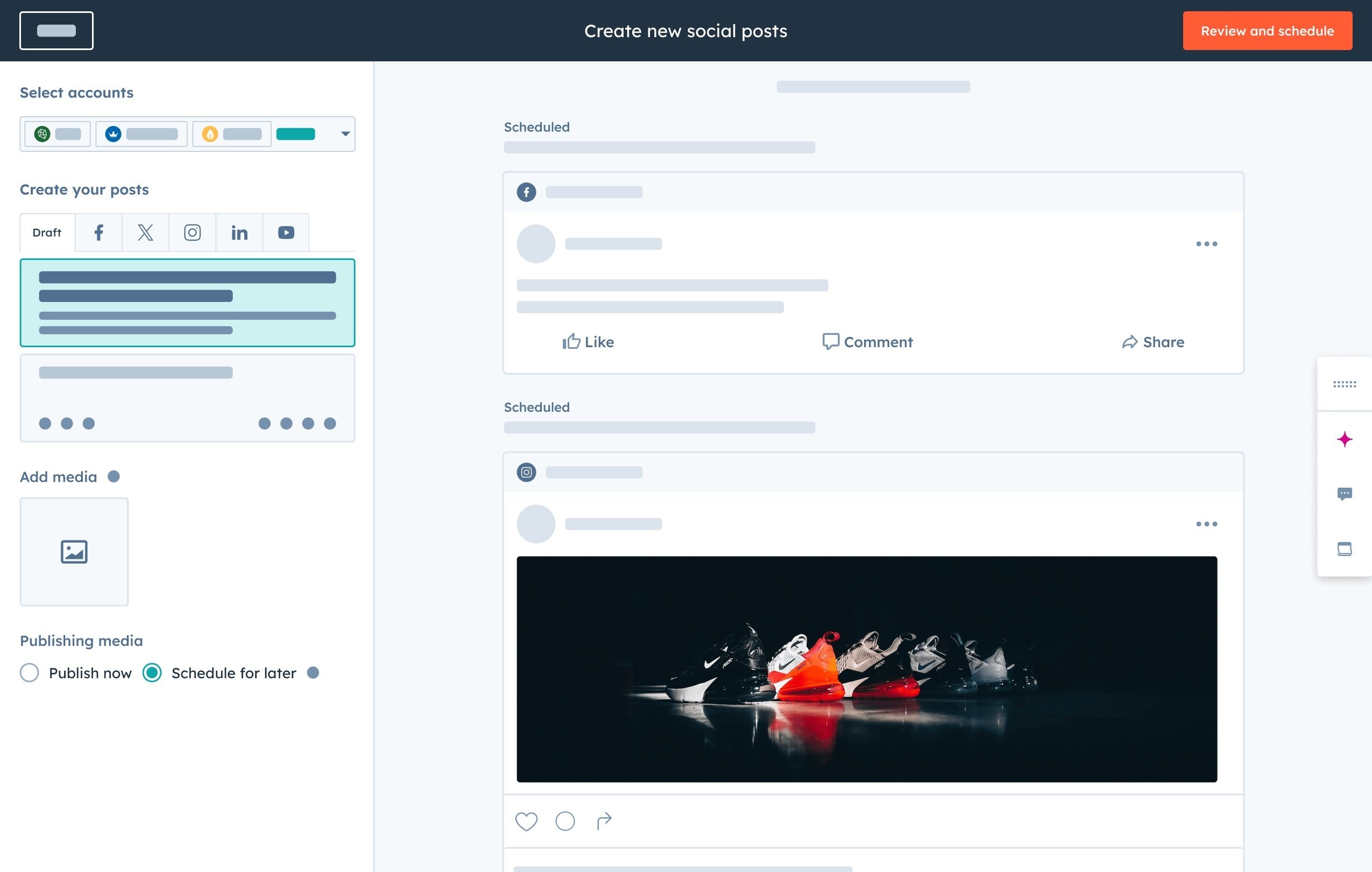
How HubSpot Uses AI to Supercharge Automation
Artificial intelligence is woven into every facet of HubSpot’s marketing automation, which enables marketers to go beyond time-consuming manual workflows.
One of the primary benefits is that the suite of marketing tools requires no coding experience and helps marketers to streamline workflows and deliver highly personalised experiences.
Here are some of the key AI-driven capabilities:
- Predictive lead scoring: Machine learning analyses historical interactions and demographic data to identify contacts who are the most likely to convert. The business can then prioritise high-value prospects automatically.
- AI content assistant: In the email and landing-page editors, AI suggests subject lines, preview text, and copy snippets tailored to your audience. This saves the marketer time and can help boost engagement.
- Smart sending: This feature uses individual contact behaviour (such as past open rates and time zones) to determine the optimal send time for each email, to improve deliverability and open rates;
- Workflow builder recommendations: In-app prompts suggest pre-built workflow templates and branching logic based on your goals. This helps to guide the user through complex if/then setups without any coding knowledge;
- Content strategy suggestions: AI analyses keyword gaps and audience interests to recommend blog topics, social media posts, and related content ideas that resonate with a business’s target personas;
Ultimately, the AI enhancements embedded in HubSpot’s marketing tools help turn complex automations into straightforward, results-driven processes.
10 Ways to Use Marketing Automation with HubSpot
Marketing automation is a daily driver for businesses aiming to scale smarter. If set up correctly, you can end up with a self-sufficient ecosystem of interconnected parts.
Below are 10 practical ways real teams use HubSpot to streamline their marketing efforts.
1. Welcome Series for New Leads
When a new contact fills out a form, HubSpot’s automations can instantly trigger a personalised welcome email series;
Use this to introduce your brand story, set expectations, and guide leads to take the next step. After implementing a simple three-part marketing workflow, we generally see a 35% increase in demo bookings;
Why? A lot of businesses make the mistake of thinking the demo booking is the conversion and it stops there. In most cases, leads end up never following through with the actual demo.
What does a simple three-part welcome series look like?
- Email 1: Sent immediately after signing up to welcome the lead and reassure them that they made the right decision.
- Email 2: Sent one to two days later, sharing helpful content like blogs or case studies.
- Email 3: Sent a couple of days later, a call to action to start the free trial or set up a meeting.
The best thing about this is the ability to add a goal baked into the workflow. So if the lead takes the desired action, such as booking a meeting or starting the free trial, they will automatically be removed from the workflow.
2. Lead Nurturing Workflows
If someone downloads a resource at the top of the funnel, they’re likely not ready for a sales pitch just yet. That’s where HubSpot’s lead nurturing workflows come in.
You can build a series of emails that respond to how leads behave. What they click, what they view, and where they are in the funnel. For example, if a lead reads through a pricing page after downloading an eBook, that could trigger a more sales focused follow up.
We would usually also include a notification to go straight to the sales team as this is highly sought after behaviour of someone likely to close.
We’ve helped clients use this to move cold leads into Marketing Qualified Lead (MQL) territory in a matter of days. It’s about sending the right content at the right time, like a webinar invite or comparison guide.
If you have a lead nurturing workflow that does that for you, your leads will already know the value when your sales reps step in. Less manual chasing, more qualified conversations.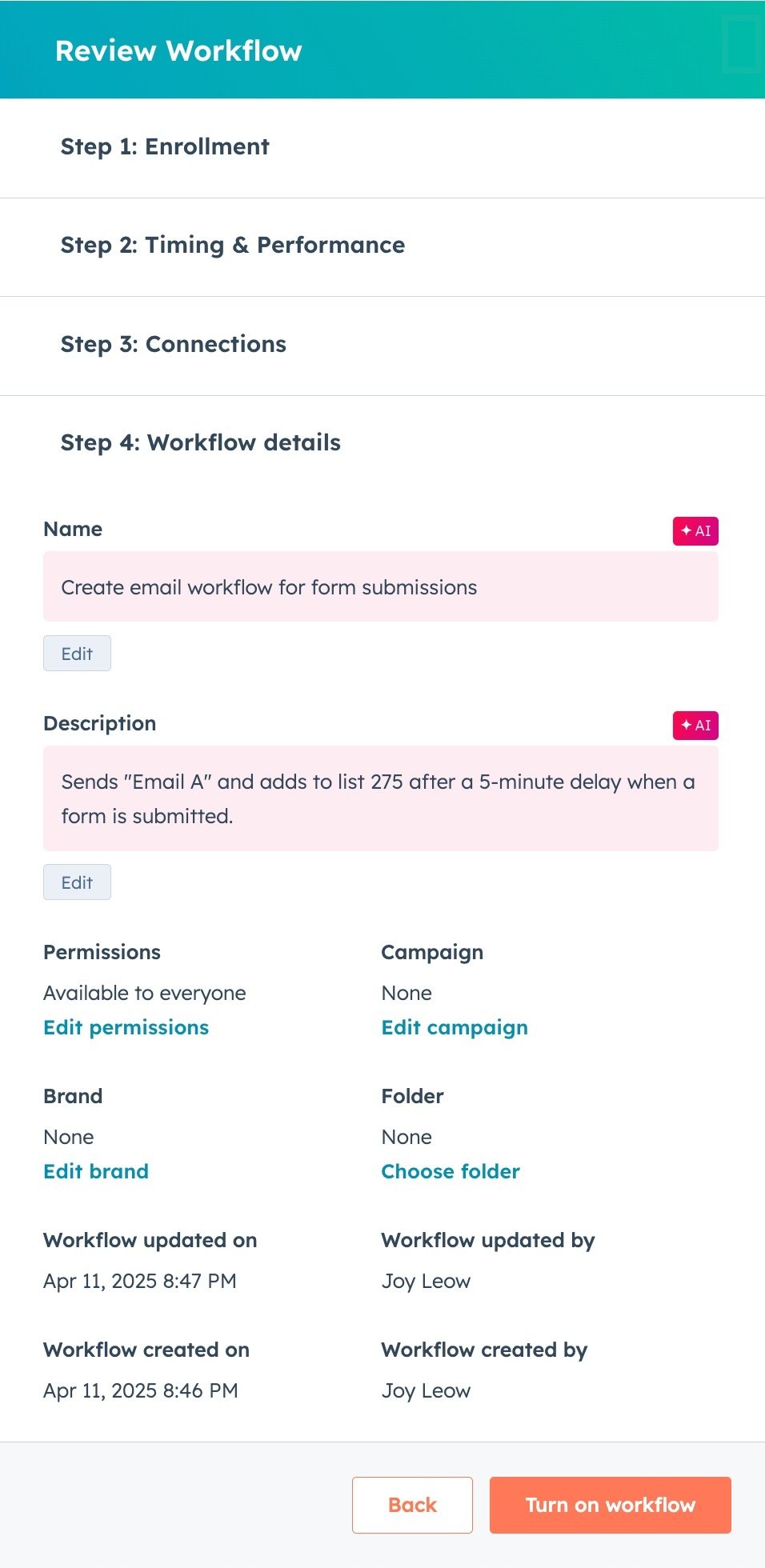
3. Webinar and Event Campaigns
Running an event or webinar takes effort, so the last thing you want is low turnout or forgotten follow-ups. With HubSpot, you can automate the whole experience.
Start with a sign-up form that adds contacts to a list, then build a workflow that sends calendar reminders, confirmation emails, and even day-before nudges to reduce no-shows.
Once the event wraps, the same workflow can send follow-up emails, share the recording, and even tag attendees based on their engagement.
We also like to throw in a quick survey to gauge feedback while the webinar is still fresh in their minds. It’s a smooth, end-to-end system that keeps your team focused on delivering value without scrambling to send last-minute emails.
4. Abandoned Cart or Incomplete Form Reminders
It’s frustrating when a lead gets all the way to your form or checkout and then disappears. But that doesn't have to be the end of the road. You can trigger a follow-up workflow the moment someone starts a key action.
Key actions such as viewing a pricing page, beginning a sign-up, or adding something to their cart. We recommend sending a quick reminder within a few hours, followed by a second email the next day that adds content or a helpful resource.
Even a simple “Need help getting started?” message can be enough to pull them back in. These small, well-timed nudges can recover high-intent leads and bring them back into your pipeline.
5. Customer Onboarding Workflows
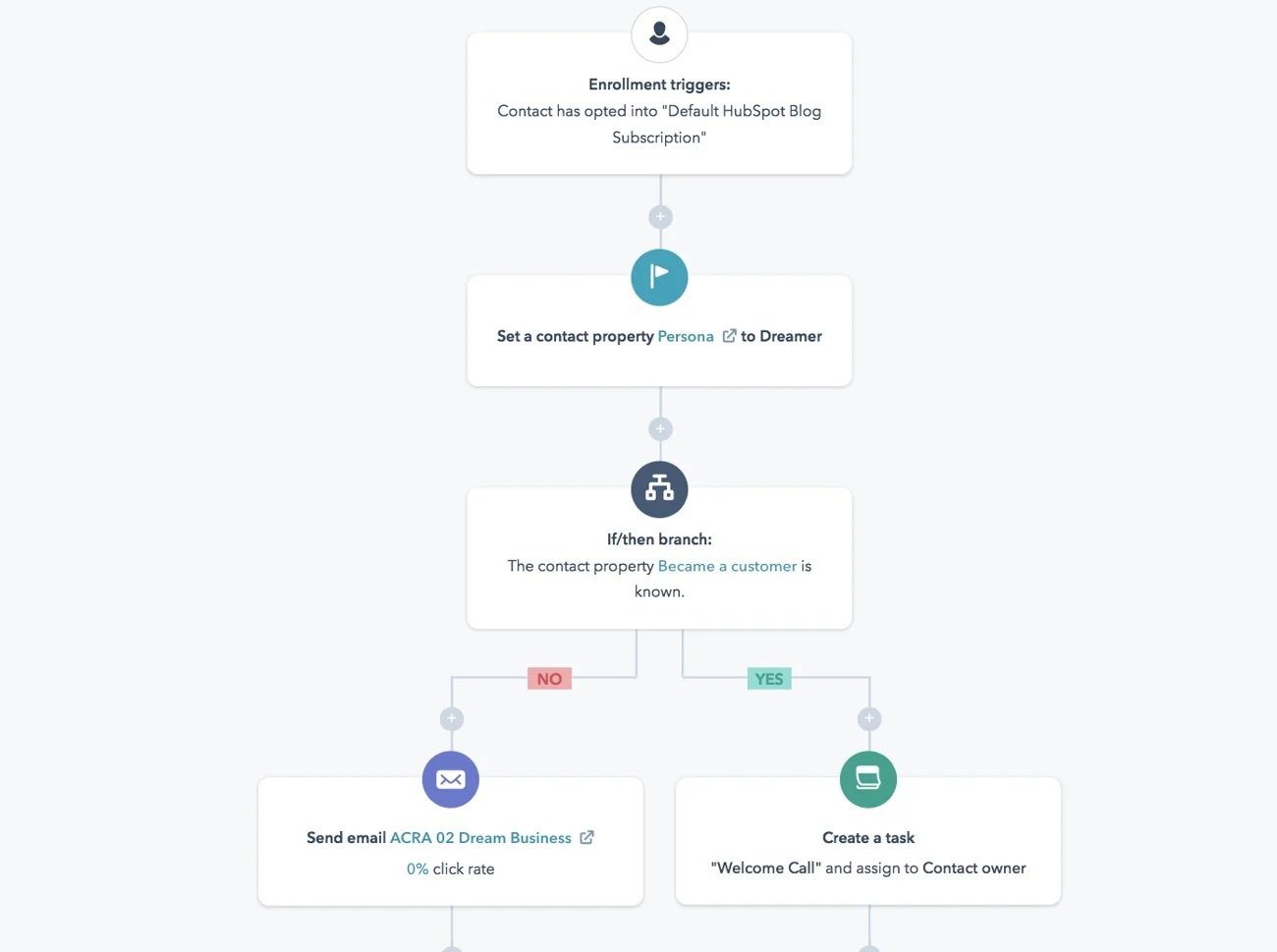
The moment someone becomes a customer, the clock starts ticking. If you don’t get them engaged fast, enthusiasm fades and churn risk climbs. That’s why onboarding workflows are so valuable.
A typical onboarding workflow we have set up countless times:
- Day 0: A warm welcome email with login instructions or next steps
- Day 2: A how to guide or video walkthrough to help them get started
- Day 5: A check-in email to offer support or answer questions
You can even build in task reminders or handoffs between teams. What’s important is that every customer gets a consistent, helpful experience. Without someone having to remember to send each email manually.
My favourite part about this automated workflow is the ability to check what level of engagement is taking place, so that you can notify a customer success manager to give the client a call if needed.
6. Trial Expiry and Upgrade Nudges
If you’re offering a free trial, timing is everything. Push the upgrade too early and it feels aggressive. Leave it too late and the users are already gone. A well-timed nudge just before expiry can make all the difference;
We usually trigger an upgrade reminder a few days before the trial ends, then follow it with a more urgent prompt the day before access is cut off;
For users who’ve been active, this can include a personalised recap of what they’ve achieved - paired with a direct upgrade link. In some cases, a small discount or added feature incentive seals the deal;
And for those who barely used the trial? A re-engagement email works better than a hard sell;
7. Re-engagement Campaigns
Not every lead is ready when you are. Sometimes, they go quiet and that’s okay. But letting them disappear without trying to re-engage? That’s where opportunities are lost.
We often set up workflows that automatically target inactive contacts after 30, 60 or 90 days. It could be a new blog, a product update, or even a “Still interested?” message with an exclusive offer. One of my favourite tactics is to ask for feedback directly. Short, simple surveys that double as re-engagement touch-points.
The goal isn’t to push. It’s to remind them that you’re still there, still valuable and relevant.
8. Internal Alerts for High-Intent Activity
Sales teams should never have to painstakingly dig through analytics to know when a lead is ready to talk. Instead, set up internal alerts that fire the moment someone takes a high-intent action.
This could include visiting your pricing page, downloading a product guide, or returning to your site multiple times in a day.
We typically route these alerts straight to the sales rep via Slack or email, so they can act while interest is high. Timing is everything. A fast follow-up can be the difference between a closed deal and a cold trail. And because it’s automated, no one has to remember to check. Your team just knows when to jump in.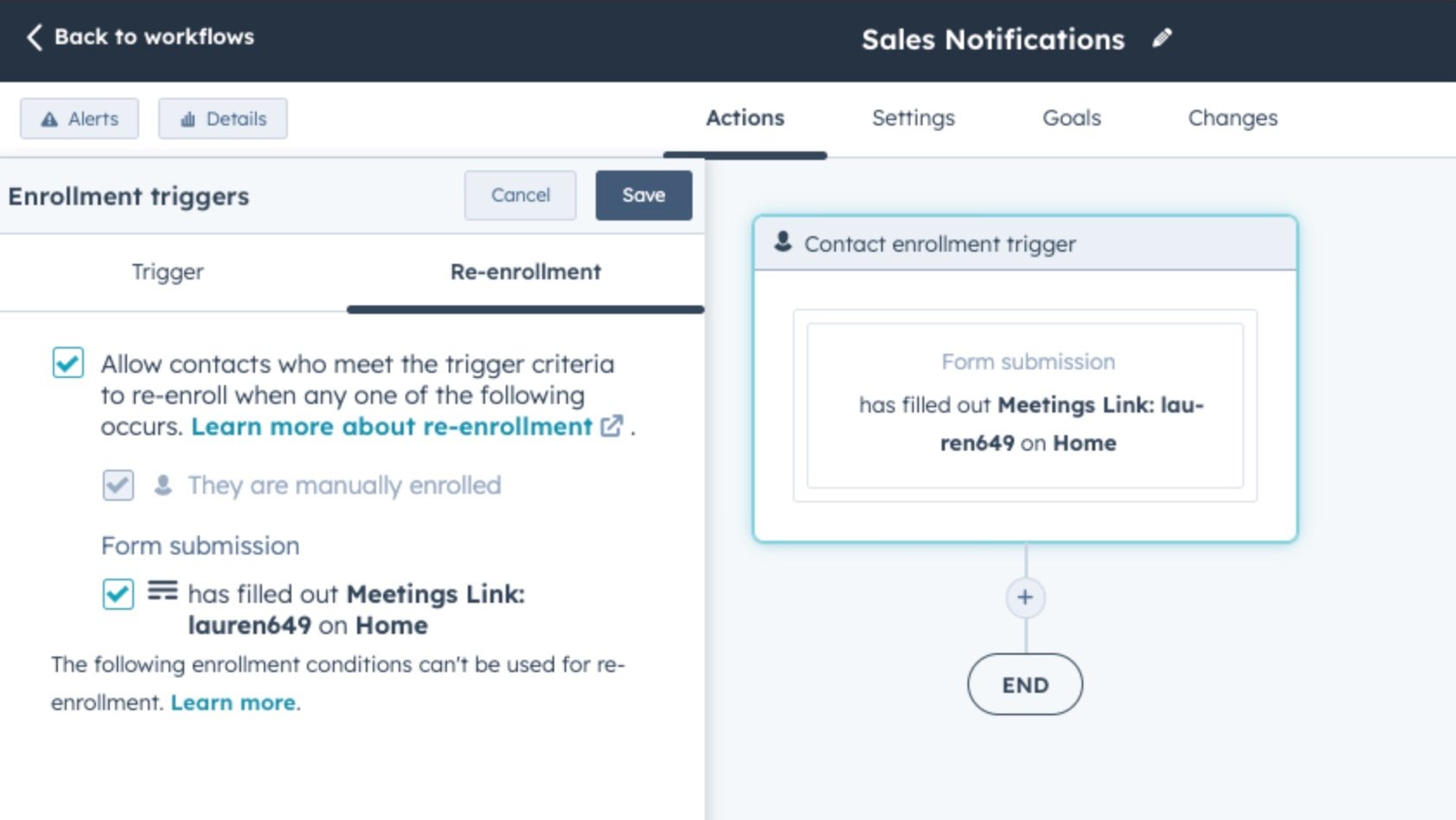
9. Feedback and Review Requests
A quick thank-you email after a support ticket or purchase is expected. But if you follow it up with a well timed survey? That’s when you start collecting real, actionable insight.
Trigger a CSAT or NPS survey a few days after the interaction, when it’s still top of mind. If the feedback is positive, a second workflow can ask for a public review or testimonial. If it’s negative, it can notify your team and open a loop for follow-up.
Simple, automated, and effective. And over time, it helps shape better products, stronger service and a steady stream of social proof.
10. Automated Lead Source Attribution
Knowing where your leads come from isn’t just a report task, it's a key to making smarter marketing decisions.
We set up automations that tag each contact with their original source the moment they enter the CRM. Whether it’s organic search, paid ads, referrals, or even signups, that data flows automatically and stays attached to the contact record.
This means no manual sorting, no guesswork, and clean reporting from day one. Better yet, it lets you personalise follow-ups based on where someone first found you. A lead from a Google ad might need different messaging than someone referred by a partner.
It’s small, behind the scenes work, but it powers bigger, more strategic moves.
How to Get Started With HubSpot Marketing Automation
Implementing HubSpot marketing automation requires a clear, methodical approach to ensure that every workflow aligns with your strategic objectives and delivers measurable results. This section introduces four best practice steps to guide your first successful launch:
1. Set clear goals
Determine specific marketing objectives and use these KPIs to guide your automation strategy. Ensure that each objective follows the SMART framework so that you can track progress and hold the team accountable. For example: Increase lead conversion rates by 20% by the end of the second quarter.
2. Identify repetitive tasks
Audit your current processes to pinpoint manual, time-consuming tasks (e.g. sending follow up emails, or list segmentation) that could be automated.
3. Select a starter workflow
Choose an appropriate use case, such as a welcome email sequence or a lead nurture drip. Thereafter, you can leverage one of HubSpot’s pre-built templates or clone a successful example for rapid deployment.
4. Test and iterate
In the workflow builder, configure triggers, delays, and if/then logic and monitor performance metrics such as open rates, clicks, and conversion rates. Additionally, use A/B tests and data insights to refine your content and segmentation.
While HubSpot’s intuitive, no-code tools enable fast onboarding, partnering with a certified agency, such as MO Agency, can accelerate more complex implementations.
Expert guidance ensures that your automations follow best practices and integrate seamlessly with Sales and Service Hubs.
Making Marketing Automation Work for You
Marketing automation offers immense potential for transforming your business’s marketing capabilities. From streamlining lead nurturing to increasing sales productivity, HubSpot provides robust tools designed for growth.
With MO Agency’s extensive expertise as a Hubspot Elite Partner, you’ll be able to implement best practice automations that are tailored to your business goals and frequently optimised to provide the best ROI.
Ready to transform your digital marketing engine? Schedule a consultation with MO Agency today.
Frequently Asked Questions (FAQ’s)
What makes HubSpot’s automations different from other platforms?
In HubSpot, automation is built deeply into the CRM. You’re not jumping between disconnected tools; everything from contact data to sales activity lives in one place.
Setting up workflows is straightforward. An intuitive interface lets you layer in logic, timing, and branching without needing a developer. You can also build multi-channel experiences across email, ads, and internal tasks, making it easy to scale campaigns across your whole funnel.
Do I need the paid version of HubSpot to use automation?
You can get started with basic automation features for free, like simple email follow-ups or contact updates. But to build more advanced workflows, think lead nurturing, segmentation and goal-based automation, you’ll need HubSpot Marketing Professional or above.
The paid version of HubSpot is where the platform's magic kicks in. It unlocks branching logic, event triggers, and more sophisticated automation tools to scale marketing properly.
Can HubSpot automation handle lead scoring and qualification?
Yes. And you don’t even have to build a workflow for it; it’s baked into the platform. You can score leads based on both contact properties (like job title or company size) and behaviour (like page views or email clicks).
Once a lead reaches a certain score, automation can trigger a handoff to sales or automatically adjust its lifecycle stage. This is a great way to keep your team focused on the most sales-ready opportunities without constant manual sorting.
How customisable are HubSpot workflows?
Workflows in HubSpot are extremely flexible. You can use multiple triggers, apply if/then branches to split journeys, and reference any custom property you’ve created.
Whether you’re building something simple like a follow-up series or a complex, multi-path campaign, you have full control over how it behaves. It’s not a one-size-fits-all system; it adapts to your business rules and customer journey.
What kind of support is available for automation setup?
There’s plenty of help available, both self-serve and hands-on. HubSpot Academy has free, high quality tutorials and walkthroughs that are great for DIY teams.
But if you’re looking for more in-depth strategy or technical setup, working with a certified Elite Partner like MO Agency makes a big difference. We help you build, test, and scale workflows that align with your goals from day one.