

If you've heard about making your website AI-readable, you've probably encountered llms.txt. It's one of those things that sounds technical but is actually straightforward - and it's something every website should have in place right now.
This article explains what llms.txt is, what it looks like, how to create one, and where it fits in the broader AI readability stack.
The one-line explanation
llms.txt is a markdown file at your website's root that gives AI systems a curated table of contents for your site. It tells them who you are, what your site contains, and where to find the important pages.
Think of it as the directory board in a building lobby. A visitor walks in, reads the directory, and knows which floor to go to. llms.txt does the same thing for AI agents arriving at your website.
Where it came from
The llms.txt standard was proposed by Jeremy Howard - co-founder of fast.ai - in September 2024. The concept is analogous to standards that already exist:
- robots.txt tells search engine crawlers what they can access
- sitemap.xml tells crawlers where all your pages are
- llms.txt tells AI systems what your site is about and which pages matter most
The key difference: robots.txt and sitemaps are about access and discovery for crawlers that will index everything. llms.txt is about context and curation for AI systems that need to quickly understand what your site offers.
What one looks like
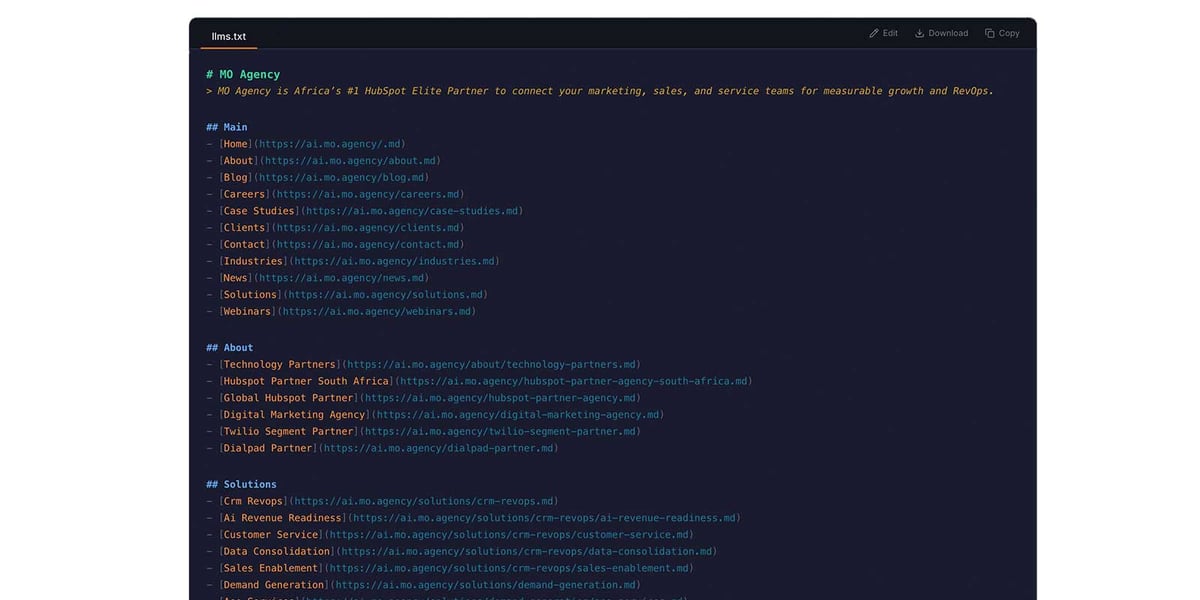
Here's a real llms.txt file, annotated:
# MO Agency
> MO Agency is Africa's #1 HubSpot Elite Partner connecting
> marketing, sales, and service teams for measurable growth.

## Main
- [Home](https://ai.mo.agency/.md)
- [About](https://ai.mo.agency/about.md)
- [Blog](https://ai.mo.agency/blog.md)
- [Case Studies](https://ai.mo.agency/case-studies.md)
- [Contact](https://ai.mo.agency/contact.md)
- [Solutions](https://ai.mo.agency/solutions.md)

## Solutions
- [HubSpot](https://ai.mo.agency/solutions/hubspot.md)
- [Demand Generation](https://ai.mo.agency/solutions/demand-generation.md)
- [CRM & RevOps](https://ai.mo.agency/solutions/crm-revops.md)
- [Digital Experience](https://ai.mo.agency/solutions/digital-experience.md)
- [Innovation & AI](https://ai.mo.agency/solutions/innovation-ai.md)

## Industries
- [SaaS](https://ai.mo.agency/industries/saas.md)
- [Financial Services](https://ai.mo.agency/industries/fintech.md)
- [Education](https://ai.mo.agency/industries/education.md)
- [Healthcare](https://ai.mo.agency/industries/healthcare.md)
The format is simple and deliberate:
- H1 (
# MO Agency) - Your site or company name. One line. - Blockquote (
> MO Agency is...) - A concise description of what your site or company does. This is the first thing an AI agent reads, so make it count. - H2 sections (
## Main,## Solutions) - Group your pages into logical categories. - Bullet entries - Each entry is a markdown link to a page, optionally followed by a description. The links should point to .md versions of the pages.
That's it. No special syntax, no schema, no compilation step. It's just a well-structured markdown file.
llms.txt vs llms-full.txt
The llms.txt specification actually supports two files:
llms.txt is the curated index - a table of contents with links. It's compact, typically 1,000-3,000 tokens, and gives AI agents a map of your site without overloading them.
llms-full.txt includes the actual content of each listed page inline. Instead of just linking to your solutions page, it embeds the full text of that page within the file. This is useful for AI systems that want everything in a single request but can run to tens of thousands of tokens for content-rich sites.
Most sites should start with llms.txt and add llms-full.txt once they have the infrastructure to keep it updated.
The important distinction: map vs territory
Here's the thing most guides don't make clear enough: llms.txt is the map, not the territory.
It tells AI agents what your site contains and where to find it. But the actual content - the detailed information that AI systems cite in their answers - lives in per-page .md files.
Each of those links in your llms.txt should point to a .md file with the full content of that page, delivered in clean markdown with YAML frontmatter. The llms.txt is the entry point. The per-page .md files are where the depth lives.
Both matter. But if you had to choose, per-page .md files go deeper and deliver more value to AI systems.
How to create one
Manual approach
For a small site, write it by hand. Open a text editor, follow the format above, and save it as llms.txt at your domain root. This is perfectly fine for sites with fewer than 30-40 pages.
The key principle: curate, don't dump. Your llms.txt isn't a sitemap. It's an editorial selection of your most important pages. Include your homepage, key service pages, about page, contact, and any content that you'd want an AI system to know about when someone asks about your company or industry.
Sitemap import
Most websites already have a sitemap.xml. A faster approach is to import from your sitemap and then curate - remove pages that don't add value (privacy policy, terms of service, campaign landing pages) and organise the rest into logical sections.
GetMD.ai provides a visual editor for this: you import from your sitemap, drag entries into sections, edit titles and descriptions, and the tool generates and hosts the llms.txt file for you. It also shows a live preview and a token count so you can keep the file lean.
Where it goes
The llms.txt file is hosted at the root of whatever domain serves your AI content. If you're using a subdomain like ai.yoursite.com, it lives at ai.yoursite.com/llms.txt. If you're serving directly from your main domain, it's at yoursite.com/llms.txt.
You also reference it in the of every page on your site with a discovery tag:
<link rel="alternate" type="text/plain"
  href="https://ai.yoursite.com/llms.txt"
  title="LLM site index" />
This tells AI agents reading any page on your site: "there's a curated content index available here."
The adoption picture
Let's be honest about where things stand. As of early 2026, around 10% of websites have implemented llms.txt. Independent audits - including a notable one by an SEO strategist at Adobe who reviewed CDN logs across 1,000 domains - show that LLM-specific bots aren't reliably requesting the file yet.
But adoption is accelerating. Anthropic, Stripe, Cloudflare, Vercel, and Perplexity have all published llms.txt files. WordPress via Yoast and Webflow have added native support. The cost of implementation is near zero and the downside of not doing it is growing.
The argument for implementing now isn't that AI crawlers will immediately reward you. It's that the standard is gaining momentum, the effort is minimal, and being ahead of the curve means you're ready when adoption tips.
Keeping it updated
The challenge with llms.txt is freshness. It's a static file. When you publish a new blog post, add a service page, change your site structure, or update content, the llms.txt goes stale.
You need a process - manual or automated - to keep it current. If you're maintaining it manually, build a reminder into your content publishing workflow: every time you publish a significant page, update the llms.txt. If you're using a tool like GetMD.ai, the sitemap import can be re-run to pick up new pages.
The worst outcome is a llms.txt file that was created once and never updated. A stale index is worse than no index - it actively misleads AI agents about what your site contains.
What to do next
- Create your llms.txt - Follow the format above. Start with your 10-20 most important pages organised into 3-4 sections.
- Point to .md files - Each link should ideally point to a markdown version of the page, not the HTML version. This is where per-page .md files come in.
- Add the discovery tag - Reference your llms.txt in the of every page on your site.
- Set up a freshness process - Decide how you'll keep the file current as your site evolves.
- Monitor - Once it's live, track whether AI bots are actually accessing it. This tells you whether the standard is being adopted by the systems you care about.
This article is part of our series on making your website AI-readable. Next: Per-page .md files · Also in this series: What is markdown? · The robots.txt audit · Content structure for AI · Content Signals · How to track LLM indexing