

If you've set up an llms.txt file, you've given AI systems a table of contents for your site. That's a good start. But the table of contents is not the book.
Per-page .md files are the book. They deliver the full content of every page on your site in clean, structured, token-efficient markdown - and they're the single most impactful thing you can do to make your website AI-readable.
The map vs the territory
llms.txt is a static file that tells AI agents what your site contains and where to find it. It's valuable as an entry point. But it has limits: it's one file, it's a summary, and it goes stale the moment you change anything on your site.
Per-page .md files go far deeper. Every page on your site gets its own markdown endpoint:
- Your homepage →
/index.md - Your about page →
/about.md - Your HubSpot solutions page →
/solutions/hubspot.md - Your blog post about terminology →
/blog/hubspot-terminology.md
Each of these endpoints returns the full content of that page in clean markdown. Not a summary. Not an excerpt. The complete content, stripped of HTML noise, with structured metadata on top.
An AI agent can read your llms.txt to understand your site structure, then fetch any individual page for the deep content. Or it can follow a discovery tag on a specific page and go straight to the markdown version. Either way, it gets pure, processable content.
What a per-page .md file delivers
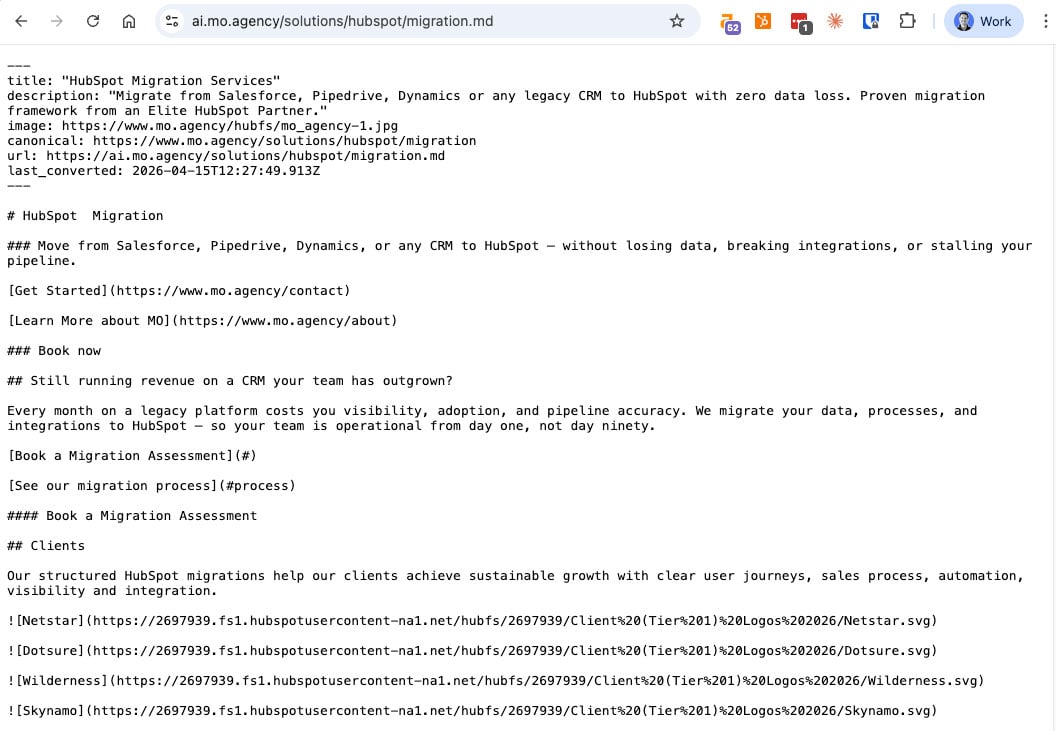
Here's what an AI agent sees when it fetches ai.mo.agency/solutions/hubspot.md:
Compare that with what the same AI agent would get from the HTML version of the same page: navigation bars, mega menu markup, tracking scripts, cookie consent HTML, nested HubSpot dnd-section divs, SVG icon definitions, footer links, JavaScript bundles - and somewhere in the middle, the actual content about HubSpot solutions.
The .md version is pure signal. The HTML version is signal buried in noise.
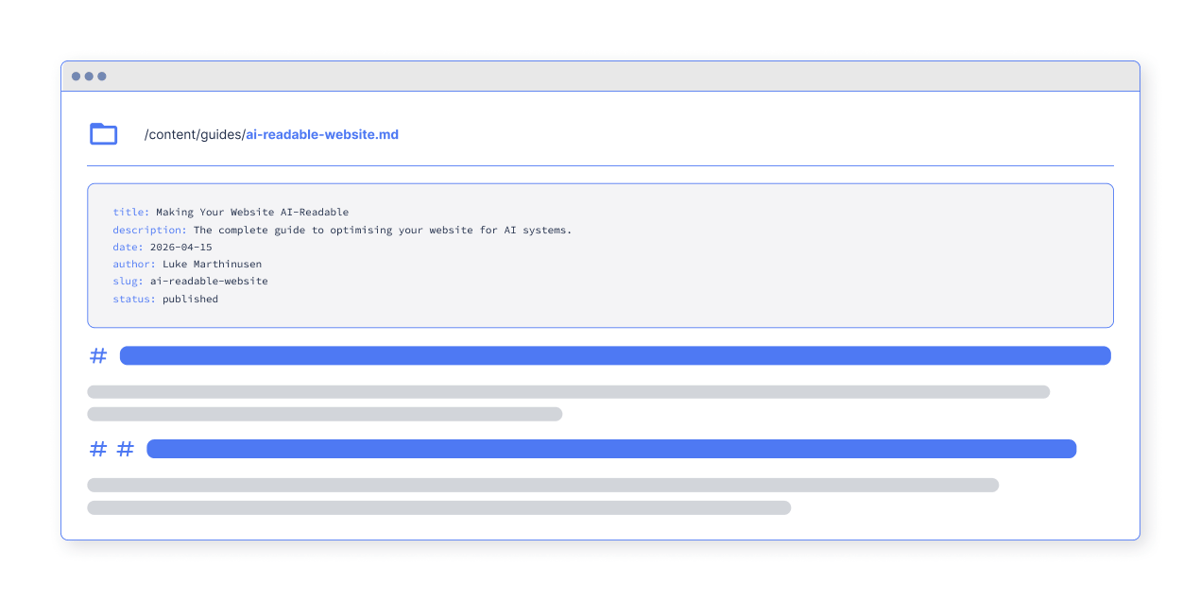
The YAML frontmatter
The block at the top of each .md file is called YAML frontmatter, and every field serves a purpose:
title - What the page is about. The AI reads this first, before any content. It's the equivalent of a book's title page.
description - A summary that provides context. Helps the AI decide whether this page is relevant to the query it's answering, without reading the full content first.
canonical - Points back to the original HTML page. This is critical: it makes the relationship between the HTML and markdown versions explicit. This is not cloaking - the canonical tells everyone (AI systems, search engines, humans) that the authoritative version of this content lives at the HTML URL.
url - The markdown endpoint itself. Self-referential, but useful for AI systems that need to know where they got the content.
last_converted - A freshness timestamp showing when this markdown was last generated. AI systems increasingly prioritise fresh content. A timestamp of 2026-04-03T09:05:42.573Z tells the agent this content was updated today, not six months ago.
How discovery works
Your HTML pages tell AI agents that a markdown version exists using a discovery tag in the :
Two tags. The first points to the markdown version of the current page. The second points to your site's llms.txt index. Both go in the of every page.
This uses the same mechanism that's powered RSS feed discovery since 2003. It's a proven web standard - not an experiment.
CMS-specific code
The page-level tag needs to output the current page path dynamically. Here's the code for each major CMS:
HubSpot (HubL):
WordPress (PHP):
Shopify (Liquid):
Webflow
Other...
Webflow's custom code doesn't support dynamic path variables, so you'll either use a static base URL or add JavaScript to insert the current path.
For HubSpot specifically, add the code to Settings → Website → Pages → Templates → Site header HTML. For blog pages, also add it to the blog template header. GetMD.ai's setup page generates the exact code for your site and CMS type, with a one-click copy button.
The update problem
Here's where it gets hard. Per-page .md files must stay current.
Your website isn't static. You publish blog posts, update service pages, change pricing, add case studies, edit team bios. Every change means the markdown version needs to be regenerated. If someone asks an AI assistant about your services and the .md file still reflects last quarter's pricing, you have a problem.
There are a few approaches to keeping markdown current:
Manual generation - Convert pages yourself using a tool like Pandoc or Turndown, upload markdown files to your server, and update them when content changes. This works for small sites but doesn't scale. Forget to update one page and the AI is citing stale content.
Scheduled pipeline - Build a script that pulls your pages via CMS API, converts HTML to markdown, and uploads to a hosting service on a schedule (daily, hourly). More reliable than manual, but you still have a freshness gap between the schedule intervals, and you need to maintain the conversion pipeline.
Automatic on-the-fly conversion - The page is converted to markdown when an AI agent requests it, then cached. When your HTML changes, the cache expires and the next request triggers a fresh conversion. This is the approach that keeps markdown in sync with your live site with no manual intervention.
As far as we can tell, Getmd.ai is the only platform that handles this automatically - it converts pages when they're requested, caches them with configurable TTL, and handles CMS-specific HTML quirks (HubSpot's nested divs, WordPress plugin injection, Shopify's Liquid fragments). But whether you use a tool or build your own pipeline, the key point stands: your markdown must stay current, or it's worse than having no markdown at all.
Verifying it works
Once you've set up per-page .md files, test them:
You should see YAML frontmatter at the top followed by clean markdown content. If you see HTML, JSON, or an error, something's wrong with the conversion or routing.
Test several pages across different sections of your site - homepage, a service page, a blog post. Each should return clean markdown with accurate metadata.
Then check your analytics to see if AI bots are actually fetching the .md files. This closes the loop from setup to verification.
Why this is the gold standard
Per-page .md files are the gold standard because they solve the complete problem:
- Token efficiency - 80% reduction vs HTML, meaning AI systems can process your content at a fraction of the cost
- Structural clarity - clean headings, lists, and links with no ambiguity
- Metadata - YAML frontmatter provides title, description, canonical URL, and freshness in a parseable format
- Coverage - every page on your site, not just a curated selection
- Freshness - when done right, the markdown stays in sync with your live site
- Discoverability - combined with discovery tags and llms.txt, AI agents can find your markdown through multiple paths
llms.txt is the directory. Per-page .md files are the rooms. Together, they make your website genuinely AI-readable.
What to do next
- Decide your approach - manual, scheduled, or automatic conversion
- Set up a subdomain - something like
ai.yoursite.comto serve markdown content alongside your HTML site - Add discovery tags - put the tags in your CMS templates
- Test with curl - verify that .md endpoints return clean markdown with YAML frontmatter
- Monitor - track which pages AI bots are accessing and whether coverage is growing
The websites that serve clean markdown for every page today are the ones AI systems will default to citing tomorrow.
This article is part of our series on making your website AI-readable. Next: The robots.txt audit · Also in this series: What is markdown? · What is llms.txt? · Content structure for AI · Content Signals · How to track LLM indexing